


September 21, 2016
Answered

getPageNthWordQuads fails

  • September 21, 2016
  • 4 replies
  • 2696 views

I have  a set of pdf pages where getPageNthWordQuads returns the wrong coordinates. The coordinates appear to be offset 15 pts up and to the left. Anybody else seen this or have a suggestion how to detect  that this page has an issue?

I checked all the values returned by getPageBox and nothing seemed different from pages that return correct results

Any word on the page is offset the same amount, so it's a translation error, not a scaling error
This topic has been closed for replies.
Correct answer Karl Heinz Kremer

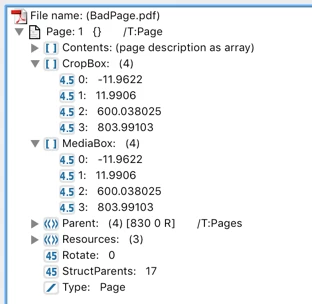
The problem is that Doc.getPageBox() will not give you the actual media or crop box, it will do some cleanup and then give you something that in this case is different from the actual media/crop box. When you bring up the preflight tool, and then browse the PDF contents, you will see this for the page boxes:

As you can see, both the media and the crop box do not start at (0.0), they have an offset of almost +-/12pt. I assume that's also the offset that you see between the word you want to place the link on and the link that's actually placed on the page.

I don't see any way you can get the true coordinates from this document (or any other document with the same type of page boxes) in JavaScript. A plug-in can do this - or an application based on the Adobe PDF library.

4 replies

Legend
September 30, 2016

Certainly you must not assume the origin is the corner of the page. You should consider

1. The Crop Box. If there is one, the corner is from the Crop box, relative to the Media Box.

2. The Media Box. This defines the corner of the original media. For example, if the bottom left is 72,72 then 0,0 is one inch below and to the left of the page

3. The Rotate value, which will rotate the viewed page after all of the above is applied.

September 30, 2016

Thanks for your answer.

Crop and Media have exactly the same values, also the same as pages where I can draw link boxes correctly.

If I show rulers, I can see that addLink is drawing a box at the position I specify based on the quads returned for the word. There's no value returned by getPageBox that tells me why getPageNthWordQuads returns coordinates for a box that's offset from the ruler measurements.

Karl Heinz  Kremer
Community Expert
Karl Heinz KremerCommunity ExpertCorrect answer
Community Expert
September 30, 2016

The problem is that Doc.getPageBox() will not give you the actual media or crop box, it will do some cleanup and then give you something that in this case is different from the actual media/crop box. When you bring up the preflight tool, and then browse the PDF contents, you will see this for the page boxes:

As you can see, both the media and the crop box do not start at (0.0), they have an offset of almost +-/12pt. I assume that's also the offset that you see between the word you want to place the link on and the link that's actually placed on the page.

I don't see any way you can get the true coordinates from this document (or any other document with the same type of page boxes) in JavaScript. A plug-in can do this - or an application based on the Adobe PDF library.

September 30, 2016

I'm back to my original issue. I look at the values returned by getPageNthWordQuads and from my measurements, they don't correspond to the position of the word on the page. My guess is the origin of certain pages is not in the corner of the page. Adobe's Matrix2D class doesn't seem to take this into account either. Values for getPageBox aren't any different for pages that have this problem and pages that don't

I'm happy to live with this issue if somebody can tell me how to programatically identify these pages

Bernd Alheit
Community Expert
Community Expert
September 30, 2016

The code creates correct links when I create a new document from your document with printing to Adobe PDF.

September 30, 2016

Thanks for responding.

I'm sure the code works for you. The code works for probably 99% of pdf pages. It's that other 1%, e.g., http://plummer.us/BadPage.pdf

If you can tell me why the code doesn't work on my example page, I'd be grateful

Legend
September 22, 2016

The crop box would give you the effective, visible, origin. But I'd expect the APIs to use the same coordinate system. I can't say because I don't know what Matrix2D is.

The problem may be that a quad is not a rect; that's why there are two types. A rect is identified by lower-left x, lower-left y, upper-right x, and upper-right y. But a quad is identified by four corners of a quadrllateral. Crucially

(a) a quadrilateral may not be a rectangle.

(b) a quadrilateral may be a rotated rectangle e.g. at 45 degrees

(c) the corners of a quadrilateral may be for an object rotated eg upside down, so the lower left of the object is not the lowest or the leftist in the page coordinate system.

You have to decide how to convert, if going to an annotation type that doesn't accept quads. One way is to get the enclosing axis-aligned rectangle, by taking min(x1,x2,x3,x4), min(y1,y2,y3,y4), max(x1,x2,x3,x4), max(y1,y2,y3,y4).

September 23, 2016

Thanks, I know the quads are horizontal rectangles from examiing the quads. I considered the possibility that the quads were upside-down, which might cause the vertical offset (since the vertical offset may be the height of the rectangle), but it couldn't cause the horizontal offset.

Inspiring
September 21, 2016

It's hard to say what's wrong without looking at the actual file.

September 21, 2016

Here's  sample bad page http://plummer.us/BadPage.pdf

Inspiring
September 22, 2016

I'm not seeing any problems. When I ran a script (using Acrobat 9.5.5) to add a strikeout markup for every word using the same quads, they were all correctly placed. Can you give an example of a word in that document and the corresponding quad that you believe isn't correct?