


Inspiring
May 28, 2019
Question

Handling file open error in Acrobat

  • May 28, 2019
  • 3 replies
  • 2132 views

Hi,

     Sorry... I don't know the correct place to place this so placing here...

     I am opening error pdf file in acrobat using applescript.  Its throwing error as popup window. I want to handle this pop up and check whether pdf file is opened or not and accordingly i need to proceed further process in pdf file.

     I am getting the below error. After that nothing proceeded in code even a alert.  I have modified the extension of html file to pdf to handling error pdfs.
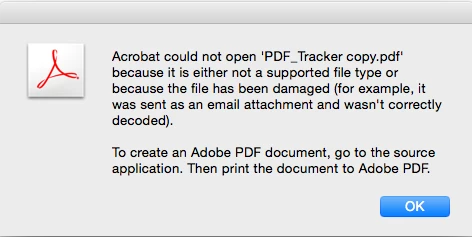
    

     Code :

set fileName to "PathToPDF"

set POSIXFile to fileName

tell application "Adobe Acrobat Professional"

    activate   

    try

        open POSIXFile

    end try

    display dialog "Document Opened"


end tell

This topic has been closed for replies.

3 replies

Brainiac
June 13, 2019

Automation using UI based tools is rarely nice. Look for a command line PDF tool. Also, to detect bad renames look first at the first five bytes of the file, it's a quick and easy check.

Brainiac
May 29, 2019

The very first question is whether the file really exists. Can you open it manually?

The second question is whether your code is correct. Does it open any valid PDF?

Go in Script Editor and run your code, with the answers activated. Anything strange there?

If you are serious about AppleScript, you might get ScriptDebugger, which has better debugging capabilities (and much more), so that you can verify what really happens.

The error message does come from Acrobat. (although Acrobat has various messages that actually mean that the file does not exist)

Sudha_KAuthor
Inspiring
June 12, 2019

Hi,

     Thanks for your reply...

     Valid PDFs are getting open but I want to validate PDF file whether its valid or not. I don't know how to validate so i thought to capture the error in catch but line after the open statement is not executed.

     So i could not able to validate the pdf files and not able to check whether document is opened via code due to pop up.

     Not able to handle this due to line after the open statement is executed until click the ok button of any error popup.

     Actually i want to check pdfdoc and then proceed.

Code :

set fileName to "PathToPDF"

set POSIXFile to fileName

set pdfDoc to null

tell application "Adobe Acrobat Professional"

    activate   

    try

       set pdfDoc to open POSIXFile

    end try

     if pdfDoc = null then

     return

     end if

    display dialog "Document Opened"


end tell

     Main reason to handle this is to capture corrupted file and error files (Extensions manually changed)

Joel Geraci
Community Expert
June 13, 2019

Opening a PDF in Acrobat is not a foolproof way of determining if the PDF is valid. Because there is so much bad PDF in the world, Acrobat will attempt to fix PDF files that are close but don't quite conform to the specification. It's able to do this quite often and can open a lot of really poorly coded PDF files. However, this does not mean that the PDF same will open in other PDF tools that do not perform this repair operation.

I suggest you rethink your solution.

Thom Parker
Community Expert
May 28, 2019

This is an AppleScript issue, not an Acrobat issue.

Thom Parker - Software Developer at PDFScriptingUse the Acrobat JavaScript Reference early and often
Sudha_KAuthor
Inspiring
May 29, 2019

Hi,

     Yes its is an applescript issue.  Can we handle this?

Brainiac
May 29, 2019

I don't think so. Acrobat isn't raising any kind of AppleScript exception, it's responding to the request with a message and the task is completed. If you were to use JavaScript you can trap a failure in app.openDoc. There is a bridge from AppleScript to JavaScript described in the Acrobat SDK.