

Answered
Help me to install Acrobat DC SDK.
I have downloaded Acrobat_DC_SDK_Windows_2021_v3 for C++.
But I don't know how to install it.
I use Visual Studio 2019.
Help me to install it.
I uploaded the Acrobat_DC_SDK_Windows_2021_v3.

I have downloaded Acrobat_DC_SDK_Windows_2021_v3 for C++.
But I don't know how to install it.
I use Visual Studio 2019.
Help me to install it.
I uploaded the Acrobat_DC_SDK_Windows_2021_v3.
Where do I have to extract the zip file?
When I extract it, I can see this.
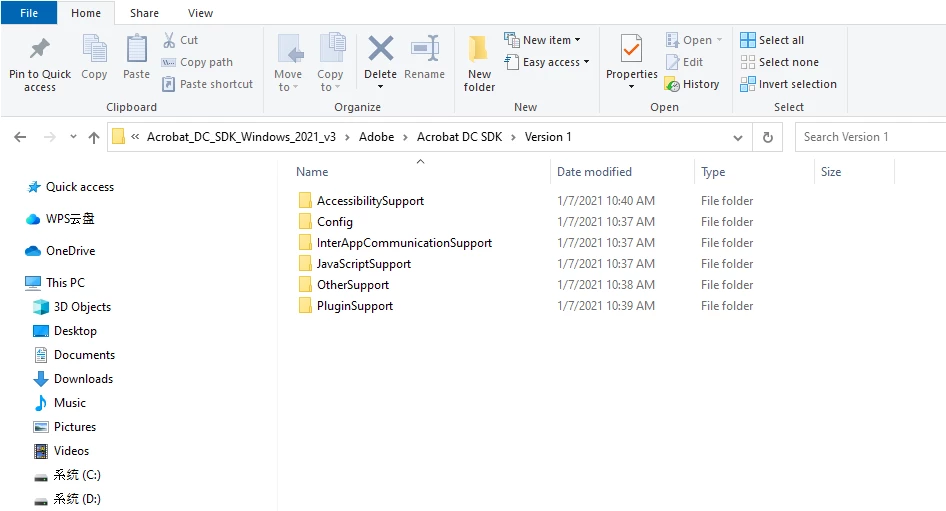
looks like your already installed it. All you have to do is put it into a folder on your local hard drive. Then for any project, you have to setup the project include path to include these folders:
...\Acrobat DC SDK\Version 1\PluginSupport\Headers\API
...\Acrobat DC SDK\Version 1\PluginSupport\Headers\SDK
Next look in this folder:
...\Acrobat DC SDK\Version 1\PluginSupport\Tools\Visual Studio App Wizard
And run this program: AcroDCPIWizInstaller.msi
This will install an Acrobat Plug-in project wizard in VS2019. When run this project wizard will create a basic Acrobat plug-in project.
But you don't need the wizard because the plug-in samples all provide the basic setup. You can use any one of them as a starting point for creating your own plug-in.
Look in this folder to see the samples:
...\Acrobat DC SDK\Version 1\PluginSupport\Samples
Already have an account? Login
Enter your E-mail address. We'll send you an e-mail with instructions to reset your password.
 AdChoices