This topic has been closed for replies.
Correct answer try67

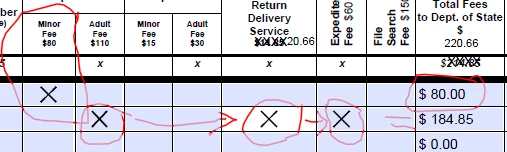
Set the "Export value" of the check-box to 80 and use it in your calculation, just like a text field.

1 reply

try67
Community Expert
Community Expert
April 8, 2016

Some say a picture is worth a thousand words, but this is not the case, I'm afraid...

Please describe what exactly you want to achieve.

April 11, 2016

When I type an X in a box I want the X to equal a number in the "Total Fees to Dept of State" column. So - if I type an X in the "Minor Fee $80" box I want it to show up in the "Total Fees" column as $80. Like it does in the example. Likewise, if I type an X in any box in the row that has a correlating amount (i.e. $110, $15) I want the "Total Fees" to reflect the addition of those amounts. $110+20.66+60=$184.85. Basically sum the Xs across the row that have a correlating fee. I did have a form that did that, but it is locked and no one knows the password. The form has been modified in some respects so I had to redo it all and now am stuck. Thanks for your response.

try67
Community Expert
try67Community ExpertCorrect answer
Community Expert
April 11, 2016

Set the "Export value" of the check-box to 80 and use it in your calculation, just like a text field.