



_Moveon21
Inspiring
May 27, 2019
Question

How to extract an image from PDF document and save on disk

  • May 27, 2019
  • 3 replies
  • 4872 views

I am exploring SDK samples, where I have found a sample code to extract image info using PDDocEnumResources API which is calling callback procedure with Cos obj, as per sample code it is easy to extract image info of XObject as mentioned in this screenshot  but how to  extract this Image Stream from CosObj ?
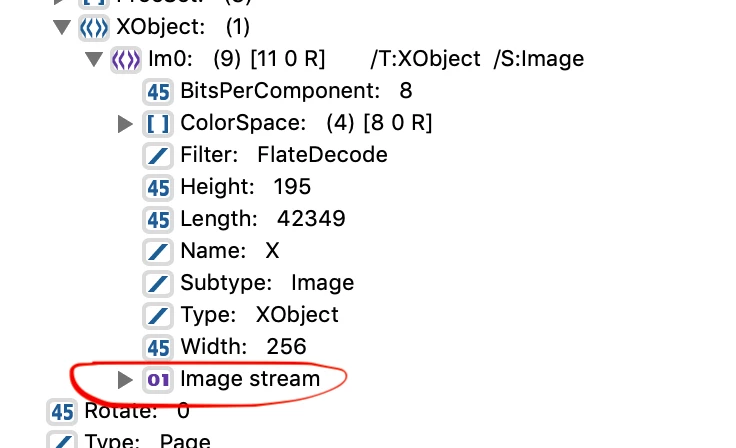
This topic has been closed for replies.

3 replies

Brainiac
May 29, 2019

You must read streams linearly (from the start towards the end). You can call ASStmRead as often as you need, in a loop, each time returning the number of bytes read.

For an image stream, in any case, you need every byte of the data. You also need to use cosOpenFiltered unless you are reading DCTDecode to treat as a JPEG file.

Have you read the PDF Reference to understand the different image pixel formats (1,2,4,8,12 bits per pixel) and colour spaces you might encounter. This is not a small project. Rendering it is an alternative, but this uses difficult APIs, and in decades of using the Acrobat SDK I have avoided them.

Brainiac
May 28, 2019

This MIGHT be the right object ( pretty small chance) but the usual thing is to start with the page and navigate recursively through the XObject and other resources to find images. A PDF contains steams for countless purposes.

As I noted though, it is not a JPEG nor any image file. You need to parse the image data and convert to the required format.

Thom Parker
Community Expert
May 27, 2019

The easy way is too purchase PDF CanOpener, which you'll need anyway if you are writing plug-ins.

COS Level Editor for PDF

You can extract the raw byte data from the stream with the CosStream functions.

CosObj cosStmln = ... your cos stream object...

ASInt32 nEncodeLen = CosStreamLength(cosStmIn);

char* pBuff = (char*)ASmalloc(nEncodeLen);

ASInt32 nTotal = 0, nLen;

ASStm stm = CosStreamOpenStm(cosStmIn,cosOpenRaw);

ASStmRead(pBuff,1,nEncodeLen,stm)

ASStmClose(stm);

// save data to file

ASfree(pBuff);

This gets you the raw (encoded) data, note that the encoding is "FlateDecode" This means its basically a JPEG. So you can save the raw data with the ".jpg" postfix and it should work.

Thom Parker - Software Developer at PDFScriptingUse the Acrobat JavaScript Reference early and often
_Moveon21
_Moveon21Author
Inspiring
May 28, 2019

Thanks for your reply,

I have Used the code snippet provided by you, I am able to save the binary raw stream in the file on disk with the .jpg extension but not able to open the file in any of the image previewers it is kind of corrupt but when I extract the same file using the extract image custom tool, the size is completely different  75 bytes vs 24 KB it seems I am still doing something wrong, I am using following code for

As you can see I am using the PDDocEnumResources API for all XObject Enumeration in PDF

PDDocEnumResources (pdDoc, 0, 0, ASAtomFromString("XObject"), cosEnumProcCB, pdDoc);

I think I am using the wrong stream I should have fetched Image stream which should be available under CosObj as key-value pair like other attributes?

static ACCB1 ASBool ACCB2 CosEnumProc (CosObj obj, CosObj value, void* clientData)

{

if ((CosObjGetType(obj) != CosStream) || (!CosDictKnownKeyString(CosStreamDict(obj), "Subtype")))

   E_RETURN(true);


ASInt32 nEncodeLen = CosStreamLength(obj);

char * pBuff = (char * ) ASmalloc(nEncodeLen);

ASInt32 nTotal = 0, nLen;

ASStm stm = CosStreamOpenStm(obj, cosOpenRaw);

ASStmRead(pBuff, 1, nEncodeLen, stm);

ASStmClose(stm);


// save data to file

ASFile asFile;

char str[500] = "/Users/moveon/DATA/Shared/t/test.jpg";

ASPathName asPathName = ASFileSysCreatePathFromPOSIXPath(NULL, str);

ASInt32 iRet = ASFileSysOpenFile64(ASGetDefaultFileSys(), asPathName,

ASFILE_CREATE | ASFILE_WRITE, & asFile);


if (iRet != 0) {

   ASFileSysReleasePath(NULL, asPathName);

}


if (ASFileWrite(asFile, pBuff, strlen(pBuff)) != strlen(pBuff)) {

   ASFileSysReleasePath(NULL, asPathName);

   ASFileClose(asFile);

   ASRaise(PDDocErrorAlways(pdErrUnableToWrite));

}

ASfree(pBuff);

}

Thom Parker
Community Expert
May 28, 2019

So Mr Test is correct It's DCTDecode that's JPEG encoding FlateDecode is different. Which makes the issue very different.

There are no direct conversion functions for images in the Acrobat SDK. And with color space variations it's not easy to even extract the pixel data. Extracting the stream data will not help you. What you'll need to do is render the stream in a local graphics context, then you can save it as a bitmap. using the regular system functions.

Thom Parker - Software Developer at PDFScriptingUse the Acrobat JavaScript Reference early and often