


Maximilion_Ma
Known Participant
April 30, 2018
Answered

How to solve "User Cancelled File Select" error?

  • April 30, 2018
  • 4 replies
  • 5423 views

Hi All,

Firstly I would like to say thank you for the people who gave me lots of help and advice regarding my previous questions in the forum. And I really learned a lot.

But there is still a question that I do not know how to figure it out.  According to Batch-Import List Data into PDF Form - KHKonsulting LLC

I try to modify the code but it always shows "User Cancelled File Select" error when I use custom command in Acrobat DC.

I only want to learn to add one field which is "Title" field to the fillable PDF form. But it doesn't work.

My data list is like(tab delimited text file): Only one row
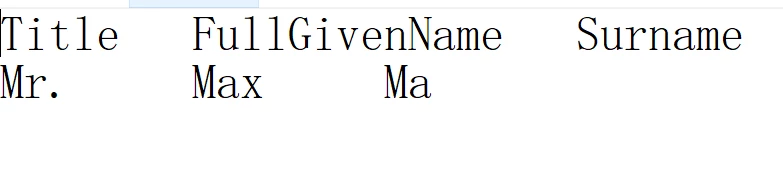
My form is like: (fillable form)

My code is :


var dataFile = "/z/JavaScriptProject/form1.txt";

var tmpDoc = app.newDoc();
tmpDoc.addField("Title", "text", 0, [0, 0, 100, 100]);

var err = 0;
var idx = 0;
while (err == 0) {

  err = tmpDoc.importTextData(dataFile, idx);
   if (err == -1)

  app.alert("Error: Cannot Open File");
   else if (err == -2)

  app.alert("Error: Cannot Load Data");
   else if (err == 1)

  app.alert("Warning: Missing Data");
   else if (err == 2)

  app.alert("Warning: User Cancelled Row Select");
   else if (err == 3)

  app.alert("Warning: User Cancelled File Select");
   else if (err == 0) {

   var title = tmpDoc.getField("Title").value;
   this.getField("Title" + (idx + 1)).value = title;
   }

  idx++;
}

tmpDoc.closeDoc(true);
this.saveAs("/z/JavaScriptProject/temp1.pdf");

And it shows when I click the custom command created button:
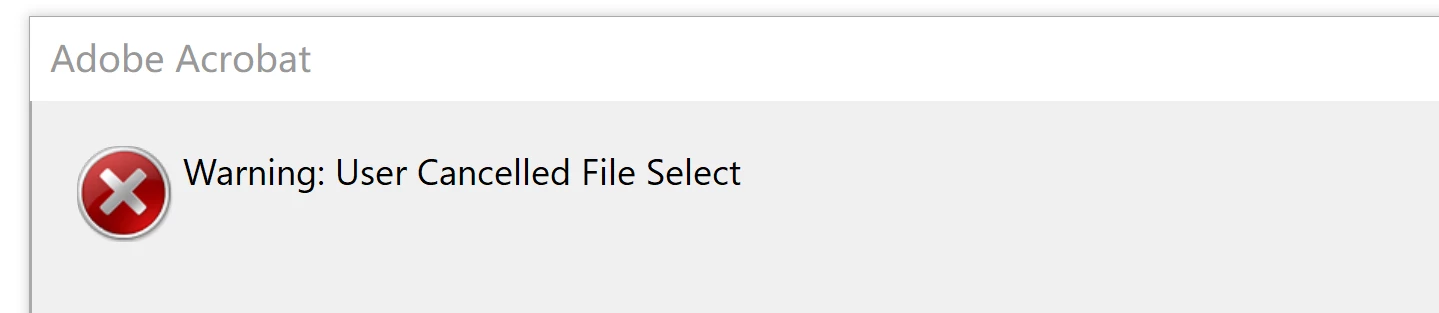
I have no idea about how to solve it. Really need some help for that. Thank you for any advice.

This topic has been closed for replies.
Correct answer Test Screen Name

https://help.adobe.com/livedocs/acrobat_sdk/11/Acrobat11_HTMLHelp/wwhelp/wwhimpl/common/html/wwhelp.htm?context=Acrobat1… This code puts the wrong meaning in error codes. Read documentation again. Also, print a count of rows found.

4 replies

Karl Heinz  Kremer
Community Expert
April 30, 2018

You are referencing my sample, so let me jump in:

Have you downloaded the files from the same blog post where you found the sample code? If those work, then the code is correct (and yes, there may be a problem with the messages associated with the error codes, but the error codes listed in at least some versions of the SDK are incorrect as well).

My experience is that almost all problems are caused by a mismatch between form fields and data file. You need exactly the same number of columns with data in you text file as you have fields in your document. The data column names also have to match the field names exactly. If this is not the case, you will end up with errors. The best way to figure out what data columns you need is to fill your form with sample data and then export the data to a text field. This will show you how your data file needs to look. The order of the columns is not important, but everything else needs to match.

Maximilion_Ma
Known Participant
April 30, 2018

Hi Karl,

Thank you for your reply.

Yes, I've tested your sample and also downloaded the files(txt file and pdf file), it works.

The form is below. Just as the code I put above, what I need to do is only to fill one field, not all(e.g. Title field). So do I also need to fill every field on this page and export the data?

Another question is:

You said that "You need exactly the same number of columns with data in you text file as you have fields in your document." But in my case, this form is a little bit different from your sample form because the columns are not regular and atactic. So I don't know how to calculate the number of the columns. In your sample, the data is : one column has many data(fields), e.g. many email addresses under "email column", my case is each fillable blank only need to be filled with one field, e.g. only "Mr." is under "Title". 

Karl Heinz  Kremer
Community Expert
April 30, 2018

Regardless of how many fields you want to fill with data, your data file needs to have data (which can be an empty string) for _ALL_ fields in the document. There is no way around that. Again, export data from your file to see what the file needs to look like.

Yes, your form is different, that's why I was referring you to a different post, which is for "normal" (and not table based) forms.

Brainiac
April 30, 2018

as I said your original code will always finish with an error message (which may not mean an error, it’s your message). So a way to force the loop exit may be what you want, if your intention was different. 

Brainiac
April 30, 2018

The code you have written has a loop which will ONLY exit after an error message. I assume that's what you want. But you won't know if it has read any valid lines. So put an app.alert to tell you, after the loop, how many good lines you read. Normal debugging technique.

Maximilion_Ma
Known Participant
April 30, 2018

Currently, I only want to add one row and,  after that, save the pdf file. That's all. Do I need to add :

=============

if (idx == 0) {

   err = -99;
}

===========

if I only need one row to be filled and then finish this loop? A little confused...

Thank you. I will learn how to "print a count of rows found".

Maximilion_Ma
Known Participant
May 1, 2018

It does not have to be pretty for the computer to understand the data. As Bernd already commented on, it's the field names you are using. Is this a form you created? If so, you can simply the field names, if it's something you cannot change, then just assume that Acrobat will do the right thing when you feed it the correct data in the text file.


OK, I got it. I will have a try to simply the field names. Thank you so much for your advice.

Test Screen NameCorrect answer
Brainiac
April 30, 2018

https://help.adobe.com/livedocs/acrobat_sdk/11/Acrobat11_HTMLHelp/wwhelp/wwhimpl/common/html/wwhelp.htm?context=Acrobat1… This code puts the wrong meaning in error codes. Read documentation again. Also, print a count of rows found.

Maximilion_Ma
Known Participant
April 30, 2018

Thank you for your reply. So after I read this document, the error should be  "Error: Invalid Row", am I right?

And I'm sorry I don't understand what is "print a count of rows found" mean. Could you please give me some hints?  Thank  you.

Bernd Alheit
Community Expert
April 30, 2018

Your text file has only one data row. You will get this error when you try reading a second data row.

And change line

   this.getField("Title" + (idx + 1)).value = title;

to

   this.getField("Title").value = title;