June 6, 2016
Answered

In the last week when I call up a PDF and press print icon I get save button?

  • June 6, 2016
  • 2 replies
  • 3348 views

Using Acrobat DC (latest upgrade) with windows 7. In the last week when I call up a PDF thru Amazon, and press print icon, I get the print page with a save button??  When I save doc, I can print thru that (different) window.  This happens with other sites that use PDF.  Anyone have a fix.  Talking to YOU Adobe!  But, would appreciate help from anyone familiar with issue.  Cheers!
This topic has been closed for replies.
Correct answer Adorobat

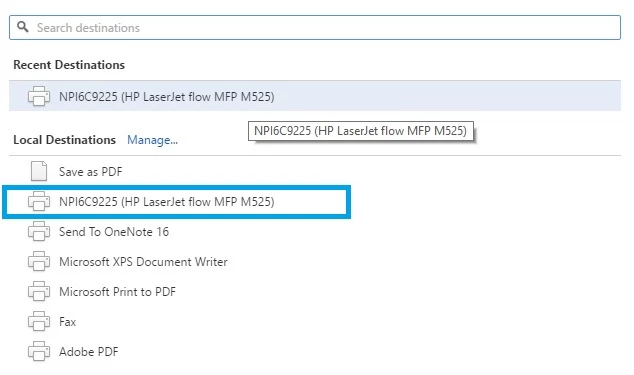
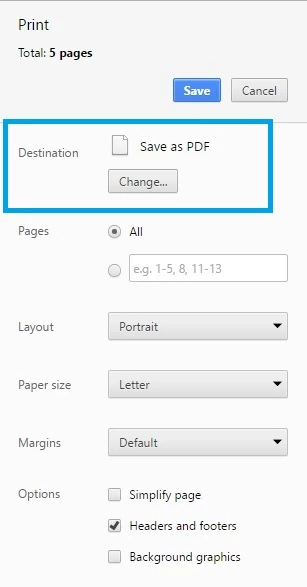
When you see Print dialogue box , Please click on "Change" in Destination and select your Physical printer which in this case is HP Laser Jet.

Below are the screenshot :

Let us know about the results.

Thanks!

Shivam

2 replies

June 7, 2016

Printer is set & active.

This is what I now get when I press print button in any software.  I would like a print button and not save.

Adorobat
Community Manager
AdorobatCommunity ManagerCorrect answer
Community Manager
June 7, 2016

When you see Print dialogue box , Please click on "Change" in Destination and select your Physical printer which in this case is HP Laser Jet.

Below are the screenshot :

Let us know about the results.

Thanks!

Shivam

Adorobat
Community Manager
Community Manager
June 7, 2016

Hi bradm55191083,

We are sorry for the inconvenience , Could you please tell what option you were getting before the upgrade ?

Assuming the after the latest upgrade, it might be possible you are getting "Save to Adobe PDF" option which tells you if you want to save that page as a pdf document on the computer. However if you want to change that option, you can change it to physical printer.

Under Acrobat>Go to File>Print>Under Printer>Select the physical printer.

Also check under control panel what the default printer is .

Press Windows + r key together on the ketboard and type control , Under Control Panel >click Devices and Printers>Select the physical printer> Right click> Set as default printer.

Let us know if that worked.

Thanks!

Shivam