Participating Frequently
October 19, 2017
Answered

Input boxes popup before can select stamp - Custom Javascript stamp Acrobat 9

  • October 19, 2017
  • 2 replies
  • 3741 views

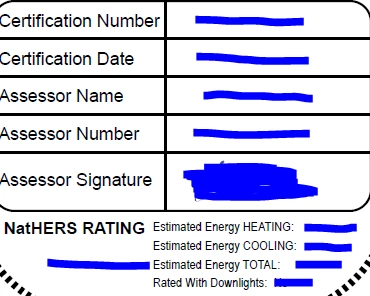
I made a custom stamp that I have been using for a while, it has 7 inputs to type in and with pop up boxes.  My issue is that I have never had it working properly and every time I go near the stamp button the popups for data entry appear before I can choose the stamp.  It gets really frustrating.

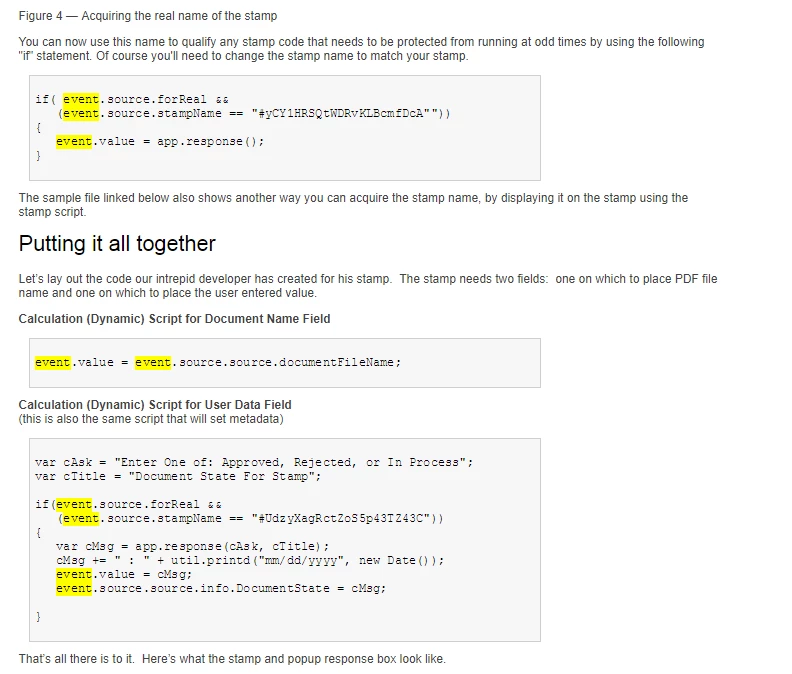
I have looked for many hours online but I can't exactly work out which part of the code I'm getting wrong.  I worked out that I needed to get the stamp name from the code (which I've done) but I don't know how to meld the event.source.forReal code with my code!  I also had the javascript calculations seperate for all the boxes with inputs but I've seen that its supposed to work much better if you only have one script.

My attempt at adding the code together is at the bottom.  If anybody can help me out and let me know where I've gone wrong I would greatly appreciate it.

Regards Jeremy
if (event.source.forReal && event.source.stampName=="#lyvn1KW9WUYWKxxaJXcLDA") {

event.value = app.response

var cResponse = app.response({

cQuestion: "Enter Certification Number",

cTitle: "Certification Number",

cLabel: "Certification Number:"

});

if (cResponse == null) {

event.value = "*NVALID*";

}

else

event.value = cResponse;

var cResponse = app.response({

cQuestion: "Enter Certification Date",

cTitle: "Certification Date",

cLabel: "Certification Date:"

});

if (cResponse == null) {

event.value = "*NVALID*";

}

var cResponse = app.response({

cQuestion: "Enter Rating",

cTitle: "Rating",

cLabel: "Rating:"

});

if (cResponse == null) {

event.value = "*NVALID*";

}

else

event.value = cResponse;

var cResponse = app.response({

cQuestion: "Enter Heating Energy",

cTitle: "Heating Energy",

cLabel: "Heating Energy:"

});

if (cResponse == null) {

event.value = "*NVALID*";

}

else

event.value = cResponse;

var cResponse = app.response({

cQuestion: "Enter Cooling Energy",

cTitle: "Cooling Energy",

cLabel: "Cooling Energy:"

});

if (cResponse == null) {

event.value = "*NVALID*";

}

else

event.value = cResponse;

var cResponse = app.response({

cQuestion: "Enter Total Energy",

cTitle: "Total Energy",

cLabel: "Total Energy:"

});

if (cResponse == null) {

event.value = "*NVALID*";

}

else

event.value = cResponse;

var cResponse = app.response({

cQuestion: "Was it rated with downlights?",

cTitle: "Rated with Downlights?",

cLabel: "Rated with Downlights?:"

});

if (cResponse == null) {

event.value = "*NVALID*";

}

else

event.value = cResponse;

}

This topic has been closed for replies.
Correct answer Thom Parker

Hello Jeremy,

      To start, just as a helpful communication tip. It is a good idea to try and post code with proper formatting so we can follow it. This is especially important for large scripts.

First thing to do, remove the "event.value = app.response" line.

Just looking at the code there is one glaring issue. "event.value" refers to the value of the form field in which this calculation script is placed. Yet it's used for all the response boxes. For setting the other field values you need to use "this.getField().value"

Typically, if the response box is popping up when you show the stamps menu, then the response box code is unprotected. This is because the stamp script is executed every time the stamp menu item is exposed. However, you're script does protect the calls to app.response. So your description and the code you've posted don't match. There must be other code in the stamp file that is displaying the response box.

There are two ways to approach a fix.

1. Delete all code in the stamp file and start over with one response box in one field calculation script. Once you get that working, then try another, and remember, all calculation scripts must be protected with the first if statement in your code above. i.e. the if that use "event.source.forReal"

2.  This is the really easy solution. Joel Garcia created an incredible tool for automatically creating dynamic stamps, and its free!!! Down load it from here:

http://practicalpdf.com/the-practicalpdf-dynamic-stamp-dialog-creator-for-adobe-acrobat-dc/

2 replies

Thom Parker
Community Expert
Thom ParkerCommunity ExpertCorrect answer
Community Expert
October 21, 2017

Hello Jeremy,

      To start, just as a helpful communication tip. It is a good idea to try and post code with proper formatting so we can follow it. This is especially important for large scripts.

First thing to do, remove the "event.value = app.response" line.

Just looking at the code there is one glaring issue. "event.value" refers to the value of the form field in which this calculation script is placed. Yet it's used for all the response boxes. For setting the other field values you need to use "this.getField().value"

Typically, if the response box is popping up when you show the stamps menu, then the response box code is unprotected. This is because the stamp script is executed every time the stamp menu item is exposed. However, you're script does protect the calls to app.response. So your description and the code you've posted don't match. There must be other code in the stamp file that is displaying the response box.

There are two ways to approach a fix.

1. Delete all code in the stamp file and start over with one response box in one field calculation script. Once you get that working, then try another, and remember, all calculation scripts must be protected with the first if statement in your code above. i.e. the if that use "event.source.forReal"

2.  This is the really easy solution. Joel Garcia created an incredible tool for automatically creating dynamic stamps, and its free!!! Down load it from here:

http://practicalpdf.com/the-practicalpdf-dynamic-stamp-dialog-creator-for-adobe-acrobat-dc/

Thom Parker - Software Developer at PDFScriptingUse the Acrobat JavaScript Reference early and often
jeremyd21Author
Participating Frequently
October 22, 2017

Hi Thom,

Thanks for your more in depth response, that makes it a bit more clear.  I'll have a go with these options and let you know how I go.

Thom Parker
Community Expert
Community Expert
November 2, 2017

Hi Jeremy,   Glad I could help, and I hope your stamp was a success.

But Now there is yet another option for your dynamic stamp input. It does however require some slightly more advanced programming. At PdfScripting.com you'll find a dialog box editor.  This is a much better UI option than all the response boxes. The editor makes creating the dialog code easy, but you still have to hook it up in your stamp code.

Thom Parker - Software Developer at PDFScriptingUse the Acrobat JavaScript Reference early and often
Bernd Alheit
Community Expert
Community Expert
October 19, 2017

Look at the debugger for errors.

jeremyd21Author
Participating Frequently
October 19, 2017

I don't know how to use it and it crashes the program.  Wouldn't the debugger just show any punctuation mistakes in the code, but show nothing if I've just written the wrong code to work?

Bernd Alheit
Community Expert
Community Expert
October 20, 2017

The first event.value = app.response is wrong