April 17, 2017
Answered

Javascirpt to delete pages with specifc watermark

  • April 17, 2017
  • 5 replies
  • 1579 views

HI,

Does any one have suggestion on a Java Script that would delete pages with a specific Watermark. 

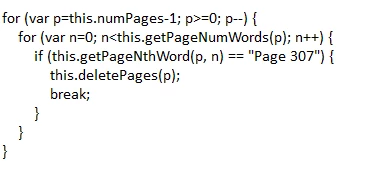
I have a script that will delete pages with specific "words", but need some help modifying it, so it looks pages with watermarks and then deletes them.  I am currently using the Action Wizard.

This topic has been closed for replies.
Correct answer Karl Heinz Kremer

Which version of Acrobat are you using?

There is actually a syntax error in try67's code, but not what your console screenshot shows: The function to delete pages is "deletePages" and not "deletePage" - the "s" is missing. in line #8. Other than that it is working and does exactly what it's supposed to do.

Can you execute other code in the console? Try the following different snippets, do they work?

Test 1:

app.alert("Hello World!");

Test 2:

for (var i=3; i>=0; i--) {

  app.alert("Countdown: " + i);

}

If you can make these two snippets work, then the script from above (after fixing the 'deletePage' error) should work as well. If you cannot make both of these snippets to run, then there is a problem with how you are trying to execute code in the console.


5 replies

April 19, 2017

Hi,

I selected full code and also tried adding it as an action script.  Neither did anything.   Not sure if you have a test file where you can test the script.  I would be curious if it works for you.

Thanks  !

try67
Community Expert
Community Expert
April 19, 2017

It would be better if you could share a sample file with us, so we can test it for ourselves.

Use something like Dropbox, Google Drive, Adobe Cloud, etc., and post the link to it here.

April 18, 2017

Thanks for the help.   I created a "Execute JavaScript"  in the Action Wizard and pasted the above.  Unfortunately, it didn't work.  The pages with the Watermark are still intact.  Am I missing a step ?

try67
Community Expert
Community Expert
April 18, 2017

Did you add a command to save the file, after running the script on it?

Try it first from the Console window, to make sure that it works, before putting it in an Action.

April 18, 2017

Tried it console window and got a syntax error.   See attached screen shot.

April 18, 2017

var aOCGs = this.getOCGs();

for (var p=this.numPages-1; p>=0; p--) {

for(var i=0; aOCGs && i<aOCGs.length;i++)

{

if(aOCGs.name == "Watermark");

this.deletePage(i);

}

}

try67
Community Expert
Community Expert
April 18, 2017

Try this instead:

pagesLoop:

for (var p=this.numPages-1; p>=0; p--) {

    if (this.numPages==1) break pagesLoop;

    var aOCGs = this.getOCGs(p);

    if (aOCGs!=null && aOCGs.length>0) {

        for (var i=0; i<aOCGs.length; i++) {

            if (aOCGs.name == "Watermark") {

                this.deletePages(p, p);

                continue pagesLoop;

            }           

        }

    }

}

EDIT: fixed mistake in the code.

April 18, 2017

Hi,

Its been a few years since I dabbled in Java Script, so hoping to get some feedback.   I don't think I structured the script correctly.  Bottom line is that I have a pdf file that has pages with a "Watermark".    I need the Java Script to find the pages with the "Watermark" and delete them.  I am using the Action Wizard.

try67
Community Expert
Community Expert
April 18, 2017

Almost, but not quite... Post your code as text and I'll help you fix it.

try67
Community Expert
Community Expert
April 17, 2017

Do you mean watermarks with a specific name? If so, then you can use the

getOCGs method to retrieve all the Optional Content Groups on a specific

page (a watermark is placed in such a group), and then search that array

for the one you're after. If you find it, then you can delete that page.

On Mon, Apr 17, 2017 at 3:30 PM, chas37922860 <forums_noreply@adobe.com>

April 17, 2017

Would I use the same method if I wanted to delete all pages in a document that would have a watermark ?  or is there a quicker option ?

Thanks

try67
Community Expert
Community Expert
April 17, 2017

Not sure what you mean... That is​ the way of doing that.