


Participant
April 24, 2017
Question

Need help with custom javascript

  • April 24, 2017
  • 2 replies
  • 377 views

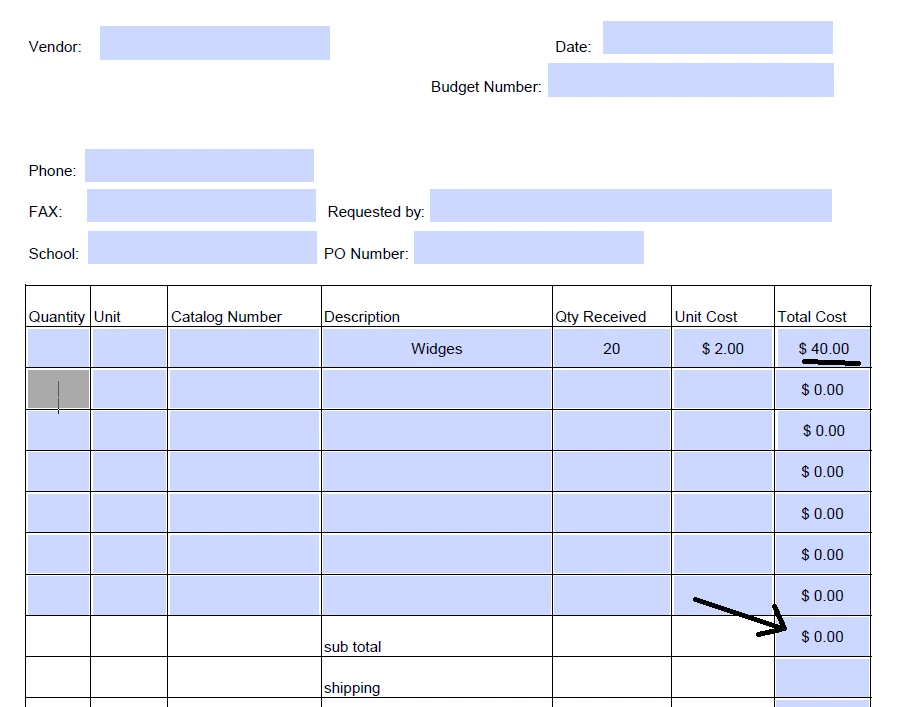
I have a line item order form I'm working on. There are seven lines in which the user can entered their quantity/unit cost/etc. I've set everything up to calculate the total cost for each line (last column on the form), and then these total costs are summed as the sub total at the bottom of the form. This works beautifully. The problem is I think I need a custom code to sum the sub total at the bottom of the form EXCEPT when there is only one total cost value on the form in which case the sub total field should just grab that with no calculation. I hope this makes sense? Thanks for any help you have!
This topic has been closed for replies.

2 replies

try67
Community Expert
Community Expert
April 24, 2017

No, there's no need for any special calculation. If you sum multiple fields and only one of them has a value the result will be identical to the value of that field.

My guess is that your field calculation order (NOT the same as the tab order!) is incorrect.

You can set it in Form Edit mode, under More (or Other Tasks, depending on your version of Acrobat).

Participant
April 24, 2017

This is very helpful. Thank you!

Participant
April 24, 2017

So what I'm trying to say is in Javascript is:

If Total CostRow2 = 0 then Total Costsub total = Total CostRow1

Otherwise, Total Costsub total = sum of Total CostRow1 -> Total CostRow7

I hope this helps clarify.