


scott_ridings
Participant
January 11, 2016
Answered

Need reference library acroexch.dll I need this to do some automation for Excel to PDF. What product is this file in or where can I get it?
  • January 11, 2016
  • 1 reply
  • 9943 views

I need this to do some automation for Excel to PDF. What product is this file in or where can I get it?

This topic has been closed for replies.
Correct answer Karl Heinz Kremer

Thank you so much for your reply! It still didn't work though. Maybe there is another problem.

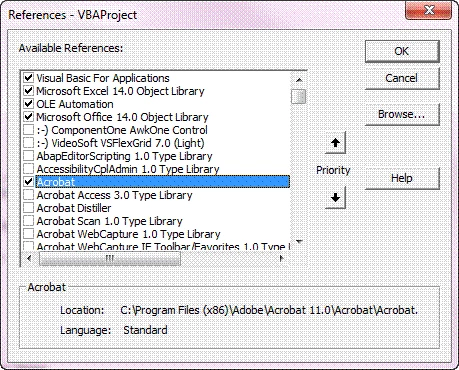
I checked the box for the reference.

Then I got This

any Ideas?


The correct function is "CreateObject" - you have it misspelled.

1 reply

Legend
January 11, 2016

This is part of Acrobat Pro and Acrobat Standard. It is not redistributable.

scott_ridings
Participant
January 12, 2016

Do know what the name of the reference library is? When I'm in Excel's Visual Basic Editor and scrolling through the reference library I have checked every box that says Adobe, Acro, or PDF and it still doesn't work. and I don't know why. Below is the code.

Sub ReadAdobeFields()


    ROWnum = 1

    Dim AcrobatApplication As Acrobat.CAcroApp
    Dim AcrobatDocument  As Acrobat.CAcroAVDoc
    Dim Fcount As Long
    Dim FieldName As String
   
    On Error Resume Next
    Set AcrobatApplication = CreatObject("AcroExch.App")   '<----- this is where it messes up it says "SUB or FUNCTION is not defined". It's because I don't have the correct reference library
    Set AcrobatDocument = CreatObject("AcroExh.AVDoc")
   
    If AcrobatDocument.Open(Range("C:\288701\Desktop\Test.pdf"), "") Then
        AcrobatApplication.Show
        Set AcroForm = CreateObject("AFormAut.App")
        Set Fields = AcroForm.Fields
        Fcount = Fields.Count
       
        For Each Fielf In Fields
            FieldName = Fields.Name
           
            ActiveSheet.Range("B" & ROWnum) = Field.Name
            ActiveSheet.Range("C" & ROWnum) = Field.Value
            ActiveSheet.Range("D" & ROWnum) = Field.Style
        Next
       
    End If

End Sub

When I'm checking these boxes what is the name?

Any help you can give would be very helpful? Thanks!

Participant
June 26, 2019

Great!!!!

I wonder if its posible to get more info from the fields (Name, Value, Style), like de # or the page. I was looking in the web, but no succes.