


New Participant
June 22, 2016
Answered

No attachments but Save As Enabled says there are?

  • June 22, 2016
  • 1 reply
  • 709 views

Using Acrobat X Pro. Used Acrobat plug-in in Word to create a PDF, then copy/pasted form fields from older form into the new PDF. Applied password security. Saved as Reader Enabled PDF. This has worked just fine in the past. 

Now when I try to save as enabled with Reader Rights I get the following message:

     This document contains attachments. Reader features will only be enabled for the main document, not for any of the attached files.

There are NO attachments. Why am I getting this message?  Thanks.
This topic has been closed for replies.
Correct answer George_Johnson

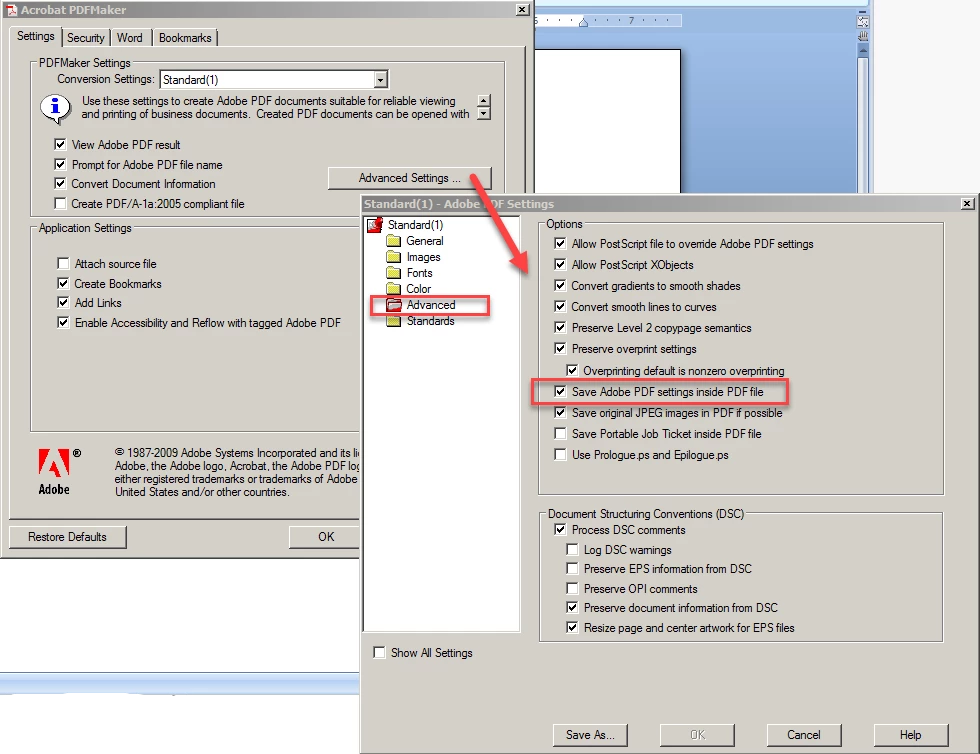
Thanks for the document. There is an attachment named "tablet.joboptions", which you can see in either Acrobat or Reader in the Attachments panel. You can safely delete it, and if you don't want it to happen in the future, configure PDF Maker in Word so it's not automatically included when you generate the PDF from the source document:

1 reply

Inspiring
June 22, 2016

It's hard to say without seeing the document. How have you confirmed that there are no attachments?

New Participant
June 22, 2016

Thanks for responding. It was created from an individual 2-page doc. Actually a pretty old-fashioned form, intended to be downloaded and filed in. I'd attach but not seeing a way to do that here.

Is there a way to check for a hidden attachment?  I'm concerned now that my software is corrupted in some way.  Thank you.

Inspiring
June 22, 2016

I'd be happy to take a look at it if you want to email the form to me: acroscript at gmail dot com