



ZombieLuna
Inspiring
September 16, 2019
Answered

Open and auto fill one PDF from another with a button

  • September 16, 2019
  • 3 replies
  • 7747 views

I was unable to respond to my original post, so I'm recreating it because I'm still hoping to find some help with my problem...  I hope this is okay.

So, some history.

My original question was: Is it possible to create a fillable PDF form that open another PDF file and fills fields based on information from the first file.

The answer was a resounding yes with instructions on how to make it work.  The problem that I ran into was, while it worked on my computer - where I'm running Pro and another computer where we are running Standard - I am unable to make the button work on a terminal running Reader.

My company is running off a shared drive on the X drive on all computers, the files would be saved and held in this location for everyone in a particular department to access and use.

We attempted to open the files from the same location and we attempted to open the files from an attachment in the Master PDF.  All solutions worked on my computer (Pro) but I am unable to make it work on a computer running Reader.

It was suggested that I was having path issues, but there has yet to be a solve that works.  I am barely a lamen when it comes to Javascript.  Everything I've successfully accomplished has been with the help of users in this community or guesswork on my side (which has all been luck, let me tell you).


To start, I added a document level script to the secondary file that would open from the Master:

this.disclosed = true;

Then I created a button the Master file that would open the secondary file:

var targetPDF = app.openDoc("myContyract.pdf");

Then I added another button (I also added this script to the open button to make both scripts run simultaneously) to auto fill the fields that lined up:

targetPDF.getField("targetFieldName").value = this.getField("mySourceFieldName").value


When this worked on Pro but not on Reader, we made adjustments to the second script as follows:

var targetPDF = app.openDoc("myContyract.pdf", this);

& an attempt to open it as an attachment in the Master File:

var targetPDF = this.openDataObject("aContract.pdf");

& another attempt to open as a separate file in the same location as the Master file:

var targetPDF = app.openDoc({cPath:"PlatinumFields.pdf",oDoc:this});


All of these solutions worked perfectly with Pro and Standard, but on the Reader computer I keep getting the same error:
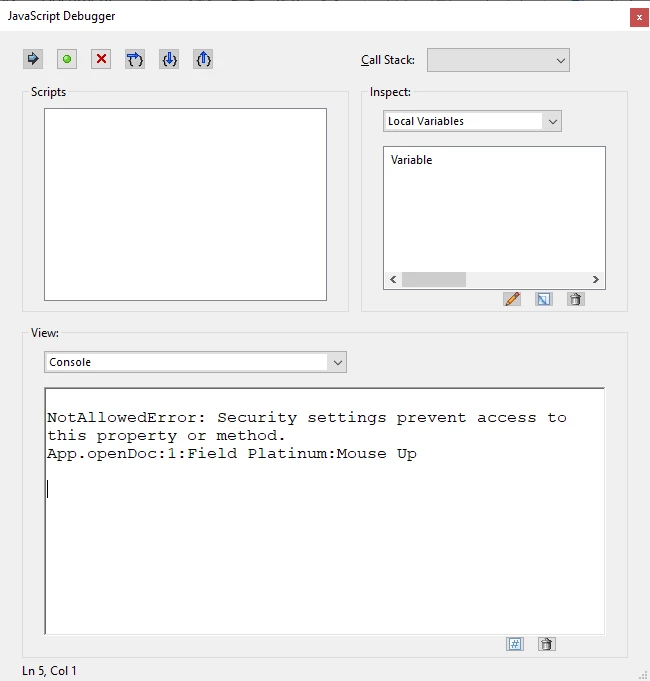
 

Any help would be extremely appreciated!  And to those who have helped me already, I am enormously grateful.  This is just an attempt to get some fresh eyes on a problem that may have closed itself for some reason or another

This topic has been closed for replies.
Correct answer BarlaeDC

Has this been figured out? I'm starting from scratch, but I'd like to do something similar. I'd like to create a fillable form with roughly 23 fields (that could be filled in Reader), that would allow me to select another PDF file (any one of 30 or so files) and fill it using the information I entered in the original fillable form.


I'm very new to this concept, and have never written a script before, so this may be a big task to take on, but I'm willing to give it a shot!


Hi,


I have been able to manage this in Adobe Reader DC, by using the commands above, but adding a "Document JavaScript" to the included document.

On the included document

  1. Select "JavaScript" tool
  2. From the options that appear select "Document JavaScript"
  3. Enter a title in the name field of the dialog that appears
  4. Click "Add"
  5. Select all the text in the new window and replace with "this.disclosed = true" ( without quotes)
  6. save file.


On the document that contains the included document add the included document and you should be able to access the fields using the following code


// this assumes you only had the main document open before hand
// and that the main document is not disclosed.
var newlyOpenedDoc = app.activeDocs[0];
// now you should be able to access the fields as normal using the variable above
newlyOpenedDoc.getField("fieldName").value = "Some Value";


The Main document is extended using the rights mentioned above.

Please see this shared document that shoud show it working.


https://documentcloud.adobe.com/link/track?uri=urn%3Aaaid%3Ascds%3AUS%3A45c7ea08-8455-424c-9086-57c6fd14c3b7


Hope this helps


Malcolm

3 replies

ls_rbls
Adobe Expert
September 19, 2019

Please disregard my last post. I documented myself better now.


Refer to this link: 

https://superuser.com/questions/1034399/opening-a-pdf-attachment-with-an-in-document-link


it worked for me using the exmple provide in the link above  using this function:


this.exportDataObject({ cName: "yourfilenamehere.pdf", nLaunch: 2 });


That was it for me. 


See slides below:


1) IN ACROBAT DC,  ATTACH THE FILE YOU NEED TO BE INVOKED BY THE BUTTON JAVASCRIPT


2) THEN CREATE THE BUTTON


3) ADD THE SCRIPT PROVIDED IN THE LINK ABOVE; ENSURE IT IS A MOUSE UP FUNCTION.


4) WHEN DONE WITH THIS PORCEED TO SAVE THIS FILE AS READER EXTENDED---MORE TOOLS


5) THE FOLLOWING SLIDES IS TO PROVE THAT THE BUTTON WITH THE SCRIPT WORKED IN ACROBAT READER


WHEN I CLICK THE BUTTON IT OPENS A NEW TAB WITH THE ATTACHMENT THAT I'VE INCLUDED


ZombieLuna
Inspiring
September 19, 2019

You are a god among men, sir! You have officially solved half of my problem. With your fix, my file opens in Reader. Huzzah!


Now, however, my fill script for taking the data from the master PDF to the (now) attached PDF is not seeing the file.  The script is not seeing the attached file as the target PDF...  I've attemtped a couple different things to try and make it work, but (no surprise, since I don't really know what I'm doing) I have had no success...


Suggestions on how to fix that?

BarlaeDC
BarlaeDCCorrect answer
Adobe Expert
March 9, 2020

Has this been figured out? I'm starting from scratch, but I'd like to do something similar. I'd like to create a fillable form with roughly 23 fields (that could be filled in Reader), that would allow me to select another PDF file (any one of 30 or so files) and fill it using the information I entered in the original fillable form.


I'm very new to this concept, and have never written a script before, so this may be a big task to take on, but I'm willing to give it a shot!


Hi,


I have been able to manage this in Adobe Reader DC, by using the commands above, but adding a "Document JavaScript" to the included document.

On the included document

  1. Select "JavaScript" tool
  2. From the options that appear select "Document JavaScript"
  3. Enter a title in the name field of the dialog that appears
  4. Click "Add"
  5. Select all the text in the new window and replace with "this.disclosed = true" ( without quotes)
  6. save file.


On the document that contains the included document add the included document and you should be able to access the fields using the following code


// this assumes you only had the main document open before hand
// and that the main document is not disclosed.
var newlyOpenedDoc = app.activeDocs[0];
// now you should be able to access the fields as normal using the variable above
newlyOpenedDoc.getField("fieldName").value = "Some Value";


The Main document is extended using the rights mentioned above.

Please see this shared document that shoud show it working.


https://documentcloud.adobe.com/link/track?uri=urn%3Aaaid%3Ascds%3AUS%3A45c7ea08-8455-424c-9086-57c6fd14c3b7


Hope this helps


Malcolm

ls_rbls
Adobe Expert
September 19, 2019

I read in another thread where Try67 asked the user where was he placing the code (i.e. custom calculating script, custom format script, validation script, java script action or a document script?)


Also, can you check if the fields that your script is invoking are not locked? (Right click on the field, select properties, uncheck the box if it is locked)

ls_rbls
Adobe Expert
September 17, 2019

In order to be able to use the form(s) in Reader DC I may suggest for you to try and save the file as a follows:


"File"---> "Save As Other" ---> "Reader Extended PDF"--->"Enable More Tools..."


This will allow your users to use your form in Reader (including older versions or PDF viewers) and be able to Fill&Sign, comment, print, and save a local copy of the form under a different filename. They will not be able to use the editing capabilities that you are trying to achieve (or have achieved) with Adobe Acrobat.

ZombieLuna
Inspiring
September 18, 2019
The fields aren't inaccessible on Reader. The Javascript instructions aren't being allowed to work for the button that I've created. I can make it work on Pro and Standard, saved with extended tools, but it won't work with Reader...