


Participating Frequently
February 28, 2020
Answered

PDF timesheet calculation

  • February 28, 2020
  • 2 replies
  • 12002 views

Hi guys!


I am a beginner at this and have searched a lot for anwers but haven´t found any that fits my problem.

I have a PDF form timesheet that uses four time inputs. ex. time1in:07:00, time1out:11:00, time2in:12:00, time2out:16:00. Now I want to sum this up in a total hours field and need help with the script to perform this correctly.

I have found a script that works to sum up the total hours of time1in and time1out but I do not know how to extend the script to also add time2in and time2out to the total sum.

The script I have is:

// start

var start = this.getField("8").value;

var startArr = start.split(":");


// finish

var finish = this.getField("9").value;

var finishArr = finish.split(":");


// difference

var hourDiff = Math.abs(finishArr[0] - startArr[0]);

var minDiff = Math.floor((Math.abs(finishArr[1] - startArr[1]) / 60)*100);


if (minDiff.toString().length == 1)

    minDiff = '0' + minDiff;


var output = hourDiff + "." + minDiff;

event.value = output;


Is there someone who might be able to help me on this one?


This topic has been closed for replies.
Correct answer Bernd Alheit

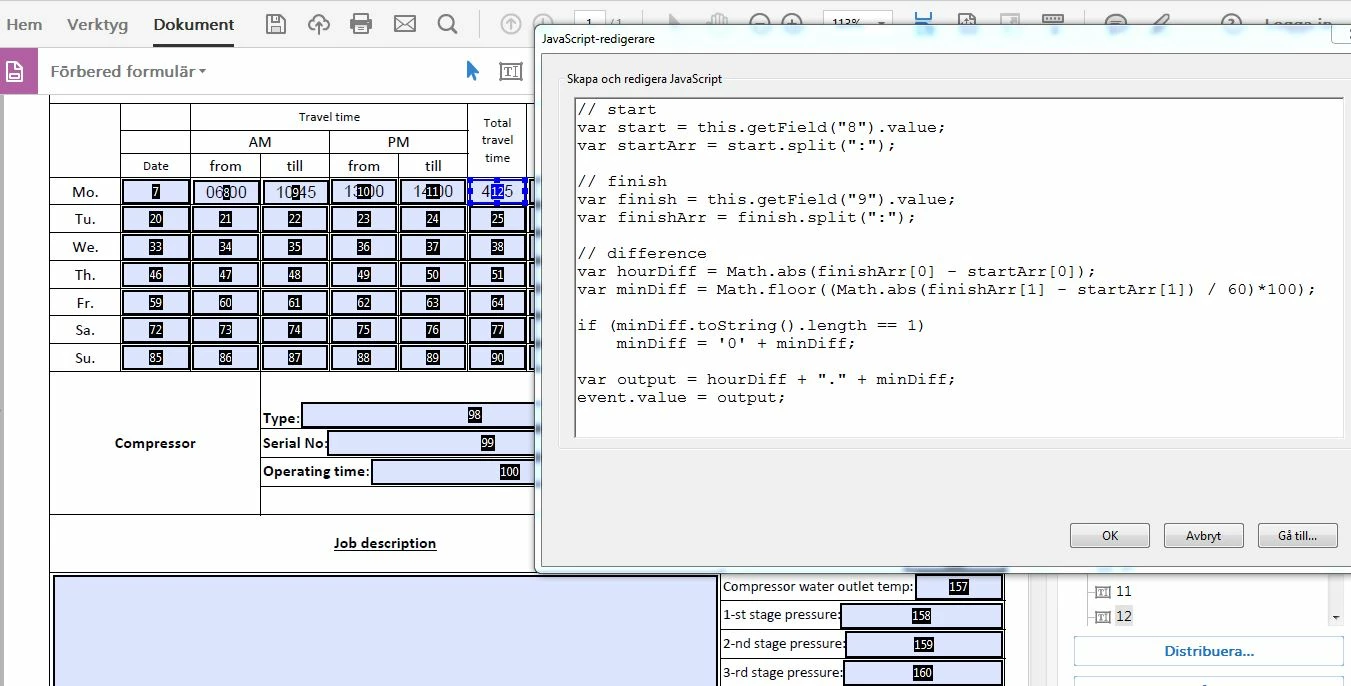
My translation might not be correct from swedish to english but something like " the value does not match the field format [12]". See attached printscreen for how I use it. 

This is the image of the "working" script for time1in(8) and time1out(9), it sums up as 4,75 hours (12)

Since time2in(10) and time2out(11) is not in the calculation they are not added to the sum.


Change the last line to:

event.value = Number(event.value) + Number(output);

2 replies

BarlaeDC
Adobe Expert
February 28, 2020

Hi,


You could just use the code again, have reformatted it so that I can be stored in on place and used by both times.


// this could would be on the fields you want processed.

var start = this.getField("8").value;
var finish = this.getField("9").value;

event.value = getTimeDifference ( start, finish );


// then you could add this to the other caluculation ( say fields 10 and 11)

event.value  = getTimeDifference( this.getField("10").value, this.getField("11").value);


// this could be added as a document JavaScript which would enable any field to call it.

function getTimeDifference ( timeOne, timeTwo) {
var startArr = timeOne.split(":");
var finishArr = timeTwo.split(":");

var hourDiff = Math.abs(finishArr[0] - startArr[0]);
var minDiff = Math.floor((Math.abs(finishArr[1] - startArr[1]) / 60)*100);

if (minDiff.toString().length == 1){
minDiff = '0' + minDiff;
}


To add a document JavaScript, you need to search all tools for "JavaScript" and select "Docuemnt Javascript".

Give the script a name "timeCalculations"

Click "Add"

Paste the function from above

Click "OK"

Clcik "Close"


Regards


Malcolm

MatMan83Author
Participating Frequently
February 28, 2020

Hi Malcolm!


Thanks for your time, as I mentioned in my starting line, I am really a novice in this javascript thing and 

feel more or less like I´m swimming in oil or something 😉


Could you specify more on how I can practically add the second calculation into the script?

Do you mean that I just repeat it after the first?

var start = this.getField("8").value;
var finish = this.getField("9").value;

event.value = getTimeDifference ( start, finish );

var start = this.getField("10").value;
var finish = this.getField("11").value;

event.value = getTimeDifference ( start, finish );


\\And then add: event.value  = getTimeDifference( this.getField("10").value, this.getField("11").value);

or should the "event.value = getTimeDifference ( start, finish );" be replaced by the one above?

and finally add: 

function getTimeDifference ( timeOne, timeTwo) {
var startArr = timeOne.split(":");
var finishArr = timeTwo.split(":");

var hourDiff = Math.abs(finishArr[0] - startArr[0]);
var minDiff = Math.floor((Math.abs(finishArr[1] - startArr[1]) / 60)*100);

if (minDiff.toString().length == 1){
minDiff = '0' + minDiff;
}


Inspiring
February 28, 2020

Your time calculation will not work if the time interval includes the change to or from Daylight Savings Time or British Summer Time. For a claculation including those situations you will need to include the dates as well as the time.

Bernd Alheit
Adobe Expert
February 28, 2020

You can use the same script for time2in and time2out

MatMan83Author
Participating Frequently
February 28, 2020

Hi Bernd!

Thanks for our input!


I suspected that but I don´t know how to practically enter the script a second time within itself correctly.

Something probably also has to be changed within the script to the math part to be able to add up the 

total sum of all four time inputs, or am I wrong?

MatMan83Author
Participating Frequently
March 2, 2020

Change the last line to:

event.value = Number(event.value) + Number(output);


Hi Bernd!

Thanks a lot!

This solved my problem with the addition of the four inputs.

However, I still get the error with the value not matching the field format [12]


Any ideas on that one?