


Radio button display issue
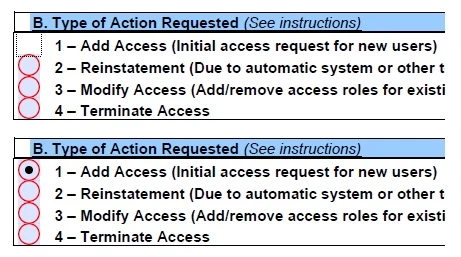
I converted a form to make it fillable, and the radio buttons work as they should mostly, but there is a display quirk that I haven't been able to figure out. When selecting the first option in any of my radio button groups, the button disappears. The other buttons in the group select and show as such, but not the first one.
Once I hop out of the group, the button displays as it should. I was thinking maybe it was too close to the next button in the group and moved it away, but that didn't help. I have a hidden button that is selected by default so that the group displays without a visible selection when the form loads.
The attached screenshot shows one of the groups while I am in it, and how it looks after I click out of the group.
Any ideas?
Craig
 AdChoices