


Participating Frequently
March 1, 2016
Question

Re install of CS 4 - second disc not working

  • March 1, 2016
  • 2 replies
  • 973 views

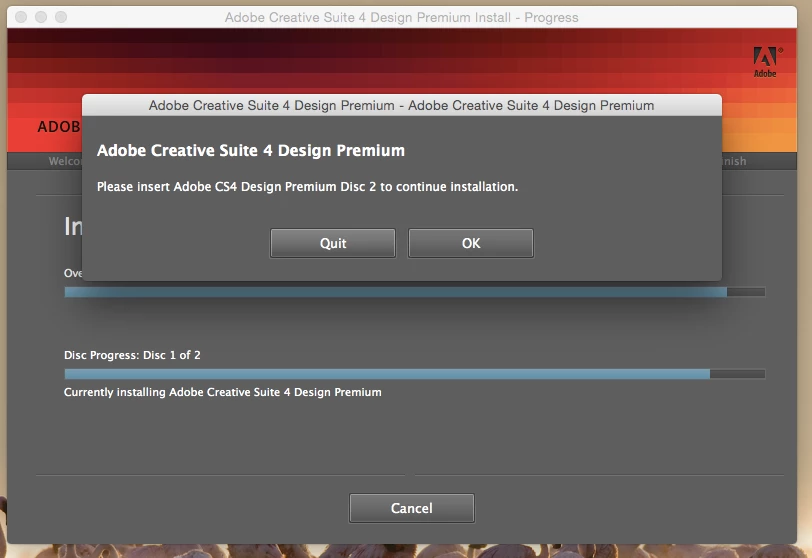
I had to rebuild my macbook air and tried to re install CS 4. The first disc worked okay and then got this message. Inserted second disc and tried to click on OK button but wouldn't let me. Tried to click on Quit, also wouldn't work. Only way to get out of this was to force quit the installer. I'm now left with only half of the products and can no longer use PS 4 on my machine. Really disappointed. Any suggestions? Have tried about 5 times same each time
This topic has been closed for replies.

2 replies

Ned Murphy
Legend
March 1, 2016

You can try downloading the installation and see if installing it that way helps...

Download and Installation Help -

https://helpx.adobe.com/download-install.html

CS4 - http://helpx.adobe.com/creative-suite/kb/cs4-product-downloads.html

You can also download the trial version of the software thru the page linked below and then use your current serial number to activate it.

Be sure to follow the steps outlined in the Note: Very Important Instructions section on the download pages at this site and have cookies enabled in your browser or else the download will not work properly.

CS3 and CS4: http://prodesigntools.com/download-adobe-cs4-and-cs3-free-trials-here.html

Tanusree
Community Manager
Community Manager
March 1, 2016

Hi fionam16830679,

Please download the design premium from here https://helpx.adobe.com/creative-suite/kb/cs4-product-downloads.html

As I believe the CD must have damaged.

Hope this works for you!

Regards,

Tanusree haldar

Participating Frequently
March 1, 2016

Thanks for this, I've tried to download and after an hour it said failed - network timeout. My internet is pretty bad in the evening :-( I'll try again. fingers crossed

Participating Frequently
March 9, 2016

Hi,

In this Case I can only suggest you to  run the uninstaller for CS4 and only uninstall Acrobat , after that  Install Acrobat by running the set up file. Please make sure that you will only check Acrobat on both the cases.

Let us know if this worked for you!


‌ive don't that and unfortunately it still has the same error. what else will you suggest as I cannot be without a working version of Adobe pro. I need to be able to view and edit PDFs for my study.

thansk

FI