


Participating Frequently
August 12, 2019
Question

Resetting a line of form fields with multiple resets per page, and on spawned pages

  • August 12, 2019
  • 3 replies
  • 1944 views

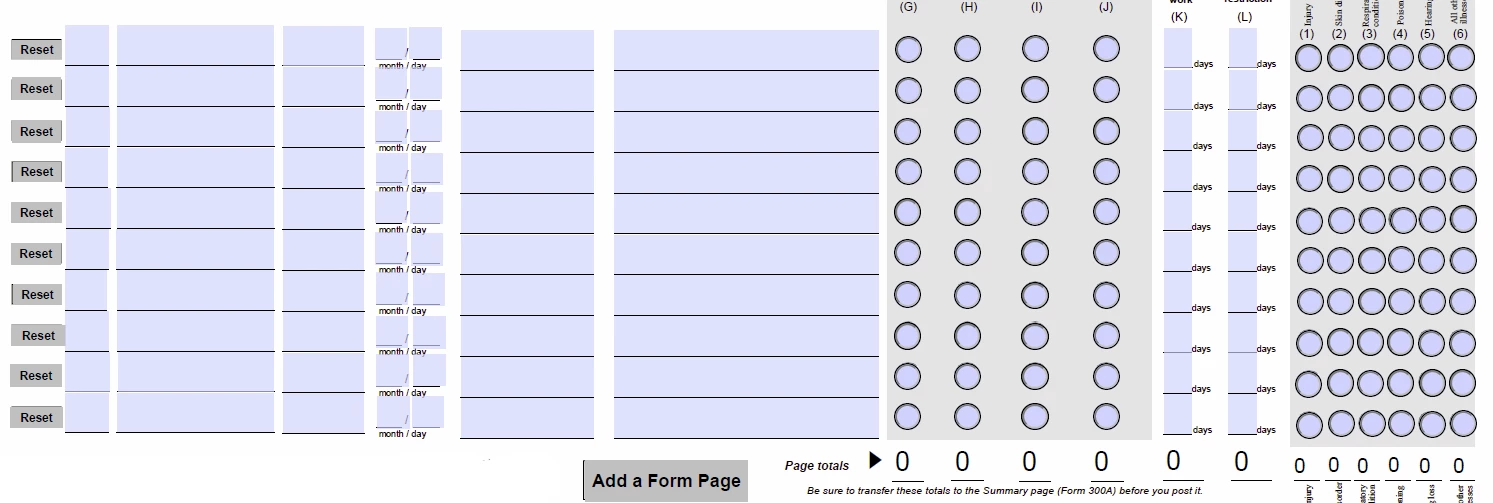
Hi..newbie to the forums as well as javascript in a pdf. I have a pdf with some very specific functionality...One of the pages has a form, with 10 different rows of data that each have their own reset button per line (illustrated below). In addition to that, this same page has a button which is supposed to duplicate this same form page again (with different fieldnames) so the user can enter an additional 10 lines of data, then click that same button to spawn yet another new page if needed, and so on and so on. As shown, each row consists of 7 input boxes, then a 4 option radio button set, then 2 more inputs, then another 6 option radio set. As if that wasn't enough, each of the individual radio button COLUMNS, and the last 2 input field COLUMNS, get tallied and totaled at the bottom, and those 'total' numbers each have to also be carried through (no matter how many of these pages the user spawns), and that total total has to appear on yet ANOTHER page of the file in a 'total total total' summary field. So, I'm good with spawning the new pages, but my problem at the moment is trying to get the individual reset buttons to only reset their own rows, and only on their own pages. I haven't even gotten to dealing with the totaling issue yet. I've tried to keep the field names small and consistent (ie the names in the 1st row are 1a, 1b, 1c, etc through 1k). Any help would be greatly appreciated!

My spawn new page button js so far is:

var SpawnPage = this.getTemplate({cName: "Template1"});

SpawnPage.spawn({nPage: pageNum + 1, bRename: true, bOverlay: false});

SpawnPage.setFocus(pageNum++);

and I've tried various unsuccessful variations for the resets js so I'm turning to experts:)
This topic has been closed for replies.

3 replies

Participating Frequently
August 19, 2019

It took me quite a while, but I finally figured out the 1st part of the issue (the single line resets on spawned pages). Now, I'm trying to figure out the summation issues.

So now what I'm trying to do is:

1. search for any fields that end with meta-total1 (ie P1.Template1.metatotal1, P2.Template1.metatotal1, P3.Template1.metatotal1 etc)

2. find the value that has already been calculated in that field (from a previous calculation)

3. add each of those numbers, plus an extra field named "differentlyNamedField" (meaning that is NOT spawned from a template page so will have a single name), and then add/total all of these values in a field called "Total Summary"

I feel like it should be fairly straightforward but it's not working for me for some reason. Any help appreciated!

try67
Community Expert
Community Expert
August 19, 2019

Can you post your code? Also, what does "it's not working" means, exactly? Is it producing no results at all? If so, are there error messages in the JS Console? Is it producing the wrong results?

try67
Community Expert
Community Expert
August 19, 2019

Thank you again try..my final code for this piece is the following (note that I'll post a final correct answer summary once all the pieces of this project are final/working):

var field;

var total = 0;

var firstfield = getField("fieldname1").value;

for ( var i = 0; i < this.numFields; i++) {

    field = this.getField(this.getNthFieldName(i));

var cnt = field.name.indexOf("T1.meta-total1");

if (/T1\.meta-total1$/.test(field.name)) {

if (cnt > 0 && field.value.length != "")

{

total+=Number(field.value);

    }

}

event.value = total+firstfield;

}

I have one more functionality question which should be the last part of this project hopefully...

On my template page, I have a field that is a "Page __ of __" field that should auto-populate when the user creates a new template page. Now to be clear, the 1st 6 pages of the file are intro information, and then page 7 is where the first 'add a page' button is, which calls forth the "T1 template", which spawns as page 8. Yet both of these pages have the Page blank of blank.

So to illustrate, page 7 starts with Page 1 of 1. When the user hits the 'add a page' and generates page 8, page 7 will be Page 1 of 2, and page 8 will be Page 2 of 2. Then when they hit the button again on the newest page, page 7 will be Page 1 of 3, page 8 will be Page 2 of 3, and page 9 will be Page 3 of 3, and etc etc.

So the code I have so far for the "add a page" button on page 7 (and this one seems to be working fine as it's a specific increment with non-changing field names) is:

var SpawnPage = this.getTemplate({cName: "T1"});

SpawnPage.spawn({nPage: pageNum + 1, bRename: true, bOverlay: false});

this.pageNum++;

this.getField("Page Number of Number 2").value = 2;

event.target.display = display.hidden;

and then the main code that I have on the template file "add a page" button is:

var SpawnPage = this.getTemplate({cName: "T1"});

SpawnPage.spawn({nPage: pageNum + 1, bRename: true, bOverlay: false});

this.pageNum++;

var prefix = "";

var nameParts = event.target.name.split(".");

if (nameParts.length > 2) {

      prefix = nameParts[0] + "." + nameParts[1] + ".";

}

if (nameParts[0] == "P" + (this.pageNum-1)) {

var f1 = this.getField(prefix + "meta-pagecount1");

var f3 = this.getField("Page Number of Number 2").value = pageNum-5;

var f2 = this.getField(prefix + "meta-pagecount2").value = f3;

};

event.target.display = display.hidden;

As if that wasn't enough, there is also a second section of the pdf that also has the "Page blank of blank", which is totally independent of the first, but that prohibits the ability to simply do a page count from the total number of pages in the document (for part 1) since there is no way to know how many pages the user might create from the second template for part 2.

Hopefully all of this makes sense....?:)


These lines are not needed and should be removed:

var cnt = field.name.indexOf("T1.meta-total1");

if (cnt > 0 && field.value.length != "")

Regarding your other question: Maybe start a new thread about it, as it's not really related to the topic of this thread.

try67
Community Expert
Community Expert
August 12, 2019

The names of the spawned fields are predictable if you know the name of the template, the page number to which the page was spawned and the name of the original fields. This should allow you to create a script that resets only the desired fields, based on the name of the fields that triggers the action.

Bernd Alheit
Community Expert
Community Expert
August 12, 2019

Following gives an error:

SpawnPage.setFocus(pageNum++);

try67
Community Expert
Community Expert
August 12, 2019

That's because setFocus is a method of a Field object, not a Template.

I think what they were trying to do is:

this.pageNum = this.pageNum+1;

Or

this.pageNum++;

Participating Frequently
August 12, 2019

Thanks both for responding to this part. I was aware of this error, but it still seemed to function by setting the focus correctly. Try67 did you mean it should be the following?

var SpawnPage = this.getTemplate({cName: "T1"});

SpawnPage.spawn({nPage: pageNum + 1, bRename: true, bOverlay: false});

this.setFocus(pageNum++);

because that still gives an error (though does still set the focus on the new page as desired).