


New Participant
October 31, 2016
Question

'Save as Adobe PDF' feature in Outlook 2016

  • October 31, 2016
  • 1 reply
  • 14994 views

After installing and using Adobe Acrobat (its happening in pro or standard) Cloud DC. I have numerous associates that when they save in Outlook 2016 they cannot and do not have the feature/function to "Save as Adobe PDF" I believe it is an outlook plug in but cannot find it or enable it.

Is there anything I can do to enable that feature???

This is what it used to look like:
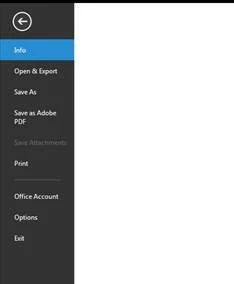
Now function is done after installing Acrobat cloud DC

Running:

OS: Windows 7 enterprise and Office 2016

This topic has been closed for replies.

1 reply

Community Manager
October 31, 2016

Hi fhmci23167619,

This may happen if you don't see the PDFMaker plugin available as ribbon for Outlook in this case. 

Click on File menu > option > Add-ins , from Manage drop down choose COM Add-ins and click Go...

You will get COM Add-ins windows, Check "Acrobat PDFMaker Office COM Addin." 

Try restarting the Outlook if the PDFMaker gets disabled you need to check the load behavior of the PDFMaker Registry Entries for Application-Level Add-Ins

Let me know if that helps.

Regards,
Tariq Dar.

New Participant
November 1, 2016

Thanks for your response, this is what I get when I go into the COM options:

I don't see PDF maker. I've even tried to add it manually by locating the .dll path for the adobe pdf plug in.

I am not having much luck on this!

Community Manager
November 1, 2016

Fhmci23167619,

Did you check the registry for load behavior?

Check the load behavior value and it should be 3. Dword is LoadBehavior.

HKEY_CURRENT_USER\SOFTWARE\Microsoft\Office\Outlook\Addins\PDFMOutlook.PDFMOutlook.
Regards,
Tariq Dar.