



subieguy2
Inspiring
May 1, 2019
Answered

Search for bookmark

  • May 1, 2019
  • 2 replies
  • 1523 views

How can I search through my list of bookmarks and assign a JavaScript action to the one I am looking for?

If I run the following script:

for (var i = 0; i < this.bookmarkRoot.children.length; i++){

console.println(this.bookmarkRoot.children.name);

}

I get the top level of my bookmarks but not the bookmarks nested under these.

Console shows:

Schematic Tools - Volume 1

Schematic Tools - Volume 2

Here is what my bookmarks look like:
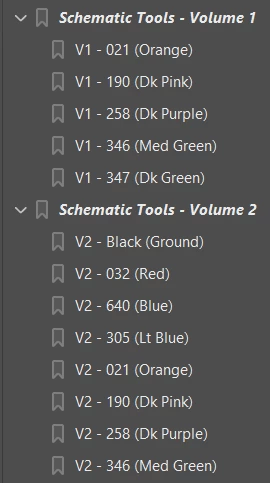
I am needing to look for specific bookmark names and assign different JavaScript functions to them.

So something like this is what I am looking for:

for (var i = 0; i < this.bookmarkRoot.children.length; i++){

if (this.bookmarkRoot.children.name == "V1 - 021 (Orange)"){

cExpr: "oneTwoOne();"

}

if (this.bookmarkRoot.children.name == "V2 - 032 (Red)"){

cExpr: "zeroThreeTwo();"

}

}

How do I search for the nested bookmark and assign it my desired function?

Any tips would be appreciated!

This topic has been closed for replies.
Correct answer Bernd Alheit

Look at the children of the children:

for (var i = 0; i < this.bookmarkRoot.children.length; i++) {

  var bk = this.bookmarkRoot.children;

  for (var j = 0; j < bk.children.length; j++) {

    console.println(bk.children.name);

  }

}

2 replies

Brainiac
May 1, 2019

You need to add a line to check that bk is defined, since you have top level bookmarks without children

Bernd Alheit
Bernd AlheitCorrect answer
Community Expert
May 1, 2019

Look at the children of the children:

for (var i = 0; i < this.bookmarkRoot.children.length; i++) {

  var bk = this.bookmarkRoot.children;

  for (var j = 0; j < bk.children.length; j++) {

    console.println(bk.children.name);

  }

}

subieguy2
subieguy2Author
Inspiring
May 1, 2019

Here is my bookmarks panel:

When I run this:

for (var i = 0; i < this.bookmarkRoot.children.length; i++) {

console.println(this.bookmarkRoot.children.name); 

  var bk = this.bookmarkRoot.children

  for (var j = 0; j < bk.children.length; j++) {

    console.println(bk.children.name);

  } 

}

Here is my console output:

Schematic Tools - Volume 1

V1 - 021 (Orange)

V1 - 190 (Dk Pink)

V1 - 258 (Dk Purple)

V1 - 346 (Med Green)

V1 - 347 (Dk Green)

Schematic Tools - Volume 2

V2 - Black (Ground)

V2 - 032 (Red)

V2 - 640 (Blue)

V2 - 305 (Lt Blue)

V2 - 021 (Orange)

V2 - 190 (Dk Pink)

V2 - 258 (Dk Purple)

V2 - 346 (Med Green)

Schematic Tools - Volume 3

V3 - 032 (Red)

V3 - 640 (Blue)

V3 - 305 (Lt Blue)

V3 - 509 (Lt Pink)

OUTSIDE 1

TypeError: bk.children is null

5:Document-Level:frgfdsgd

Why am I getting the TypeError and why is it not giving me the additional bookmarks?

Here is what is missing (and the icons look different):

@Bernd Alheit

Thank you for your help!

Bernd Alheit
Community Expert
May 2, 2019

So now that the script has located the desired bookmark...

How do I apply a javascript to it?

For example given the following code:

        for (var j = 0; j < bk.children.length; j++) {

//console.println(bk.children.name);

if (bk.children.name == "V1 - 190 (Dk Pink)"){

            console.println("Found " + bk.children.name);

bk.children{cExpr: "oneNineZero();"};

}

        }

I know my line for assigning the cExpr isn't right because that is a parameter of the createChild method.

But that is what I am wanting to do. The bookmark is already created. I am just wanting to assign my own function oneNineZero();


Use the method setAction of the bookmark.