Inspiring
November 17, 2020
Answered

Text Field not calculating properly

  • November 17, 2020
  • 3 replies
  • 2508 views

I'm hoping someone can help me figure out how to resolve my text field not calculating properly.

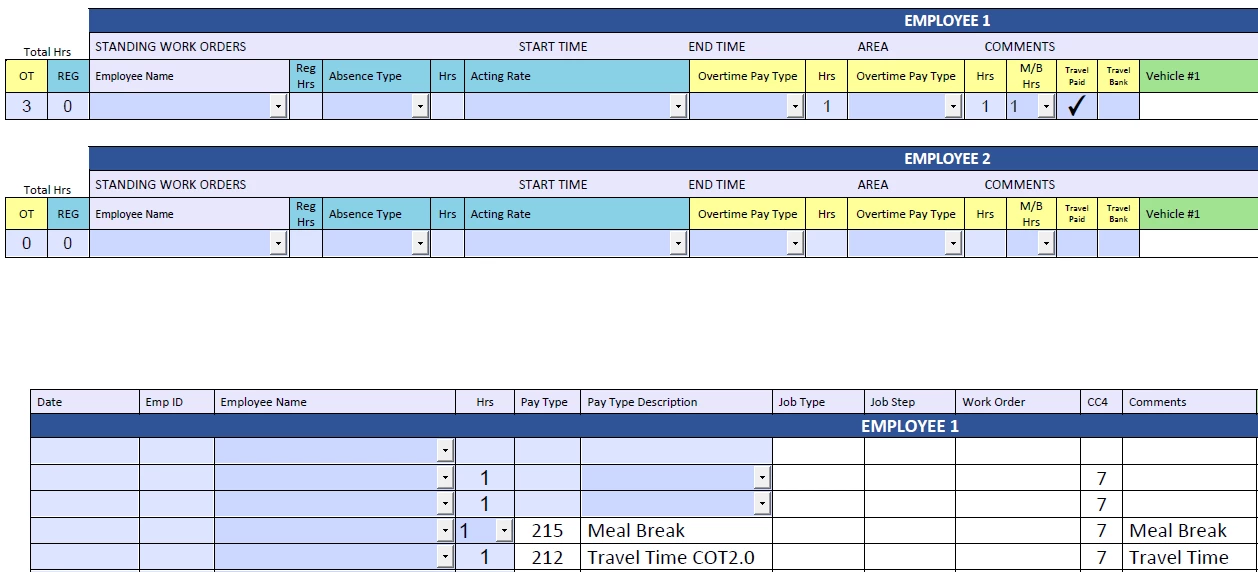
I have a text field name 'TotalOTHrsEmp1'.  I click on 'Calculate' and choose 'Value is the' and pick the fields I want to calculate the hours.  There is one particular text field I am having a problem with calculating.  It's a checkbox that populates '1' to another text field.  When I check the box the hour doesn't add up, but when I uncheck the box the hour does add up.  That's not what I want, I want the '1' hour to add up in the 'TotalOTHrsEmp1' text field when the box is ticked.  Here is what I have set up...

The checkbox is named 'TravelTimePdEmp1'.  The text field is named 'TTPdEmp1' and in this text field I have a custom calculation script as follows, 

var a ="";

if (this.getField("TravelTimePdEmp1").value == "Yes"){

a="1";

}

event.value = a;

Thank you in advance for any help with this!


This topic has been closed for replies.
Correct answer try67

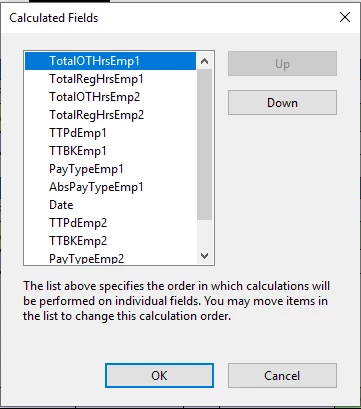
I've tried Googe Drive as well and I can't get my file to upload to share it.  Anyways, this is a snapshot of the set field calculation order.  Is there maybe something in here I need to fix?  Or could it have something to do with the one hour that populates to the text field when checking the box for travel time?  I definitely selected all the fields for the calculation, but only the other fields add up. It's really frustrating that 1 hour isn't calculating when you check the travel time box.  


You have to move "TTPdEmp1" above "TotalOTHrsEmp1" in that list, so that it calculates first.

3 replies

Bernd Alheit
Adobe Expert
November 18, 2020

It works in Acrobat Reader DC and Adobe Acrobat DC.

JR Boulay
Adobe Expert
November 18, 2020

"I've tried Googe Drive as well and I can't get my file to upload to share it"

You should try this: https://helpx.adobe.com/acrobat/using/sharing-pdfs.html


Acrobate du PDF, InDesigner et Photoshopographe
Nesa Nurani
Adobe Expert
November 17, 2020

Try check field calculation order. 

Inspiring
November 17, 2020

Thank you for the reply, I tried that but it still only calculates after I uncheck the box 😞

try67
try67Correct answer
Adobe Expert
November 18, 2020

I've tried Googe Drive as well and I can't get my file to upload to share it.  Anyways, this is a snapshot of the set field calculation order.  Is there maybe something in here I need to fix?  Or could it have something to do with the one hour that populates to the text field when checking the box for travel time?  I definitely selected all the fields for the calculation, but only the other fields add up. It's really frustrating that 1 hour isn't calculating when you check the travel time box.  


You have to move "TTPdEmp1" above "TotalOTHrsEmp1" in that list, so that it calculates first.