Participating Frequently
August 8, 2016
Answered

Updating failure

  • August 8, 2016
  • 2 replies
  • 1178 views

When I get an alert that Adobe needs to update, I clock on it and then get a dialog box that says it couldn't install and displays this link:

How to rollback Acrobat X and XI installation on Windows 64 bit

I am running Windows 10 and Adobe Acrobat Pro DC, version 2015.010.20056

The rollback inserts a line in the registry.  I don't really want to rollback, just install the update.

Suggestions?
This topic has been closed for replies.
Correct answer Adorobat

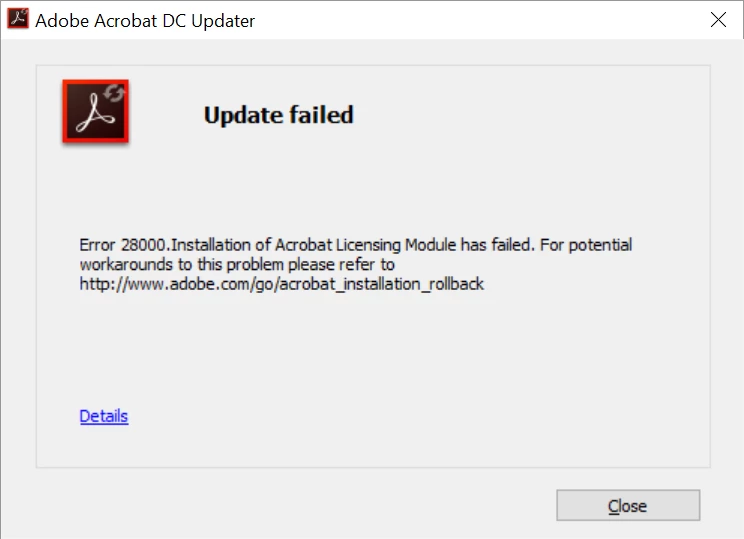
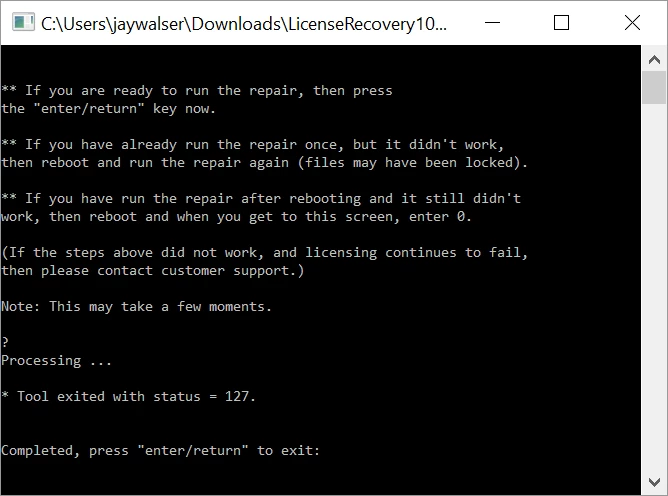
I ran through all the steps, rebooted, updated failed, ran the steps, rebooted, update failed, ran the steps, typed 0, updated failed, error dialogs below.


Try to perform the following steps:

1-Enable Admin account and then try to update Acrobat by launching Acrobat , if that doesn't work, install the latest patch given here : Adobe - Acrobat : For Windows​ .To enable Admin account , visit this link : https://support.microsoft.com/en-in/kb/555910

2- If that doesn't work , Try to repair Acrobat ,launch Acrobat, click on Help menu>then click Repair Installation .

3- If step 2 doesn't work , remove Acrobat with Cleaner tool found here : Download Adobe Reader and Acrobat Cleaner Tool - Adobe Labs , restart the Computer, reinstall Acrobat.

Let us know about the results.

2 replies

Participating Frequently
August 16, 2016

Displaying image002.jpg

Adorobat
Community Manager
Community Manager
August 16, 2016

Hi jay76408417  ,

I would like to mention that i was not able to see the image which you attached, and when clicking on the image , it is showing "Client does not have permission" error. You can directly insert image here by clicking on the Insert Image icon.

Click on insert Image, then Choose File,select the screenshot and click Open> then insert Image.

Let us know if you face any issue.

Thank You!

Shivam

Participating Frequently
August 17, 2016

Adorobat
Community Manager
Community Manager
August 9, 2016

Hi jay76408417  ,

Try to download update from here : Adobe - Acrobat : For Windows

Click on Adobe Acrobat DC Pro and Standard...... under Version. Below is the screenshot:

Let us know if you face any issue.

Thank You!

Shivam

Participating Frequently
August 9, 2016

install error and the update was rolled back.

Now what?

Adorobat
Community Manager
Community Manager
August 9, 2016

Could you please tell what error it was ?