


Participant
July 19, 2016
Answered

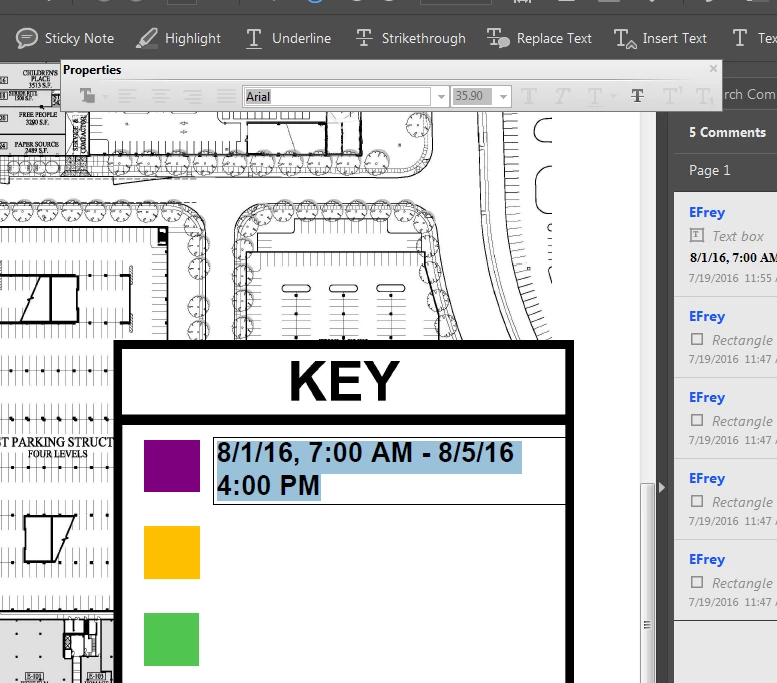
Why does properties box for text grey out when trying to change size in text box?

  • July 19, 2016
  • 2 replies
  • 1563 views

The box I am referring to is below listed as "Properties". For some reason, I cannot get the new text properties box (usually black and more modern looking) to pop up at all. It comes and goes at random times.
This topic has been closed for replies.
Correct answer AshuMittal9644438

Hi,

We have released an update today that fixes the Properties Toolbar issue and you can now continue to use it outside the Commenting app as well. Please open Acrobat or Reader DC and visit Help > Check for updates to make sure you are on the latest patch.

Details about the release: https://helpx.adobe.com/acrobat/release-note/acrobat-dc-august-02-2016.html

Please let us know how it goes.

Thanks,

-ashu

2 replies

Participant
July 19, 2016

I'm having the same issue, as of yesterday. I'm suspecting it's some bug... but same exact issue.

Running on Mac OS X

Architecture: x86_64

Build: 15.17.20050.192152

AGM: 4.30.65

CoolType: 5.14.5

JP2K: 1.2.2.36712

AshuMittal9644438
Adobe Employee
AshuMittal9644438Correct answer
Adobe Employee
August 2, 2016

Hi,

We have released an update today that fixes the Properties Toolbar issue and you can now continue to use it outside the Commenting app as well. Please open Acrobat or Reader DC and visit Help > Check for updates to make sure you are on the latest patch.

Details about the release: https://helpx.adobe.com/acrobat/release-note/acrobat-dc-august-02-2016.html

Please let us know how it goes.

Thanks,

-ashu

Adobe Employee
July 19, 2016

When in comment app, If you place the mouse cursor within the text box and do a Ctrl_E, you will see the new text properties box (black and modern looking)

Participant
July 19, 2016

Hi, thanks for responding. I frequently use that command and it is still not popping up. Could this just be a bug I am experiencing?

Adobe Employee
July 19, 2016

What's the version you currently running with?

Help -> About Acrobat Pro DC -> version...