


December 27, 2016
Answered

How do i enable thethe JavaScript console - Acrobat XI Standard?

  • December 27, 2016
  • 2 replies
  • 11956 views

I have a simple task (of exporting and saving pages of a pdf as specific names) that is repeated and id like to be able to automate somehow through JS.

I am trying to enable the console using this guide:

https://acrobatusers.com/tutorials/javascript_console

But find that the checkbox for "Enable JavaScript debugger after Acrobat is restarted" is not there. See my screenshot.
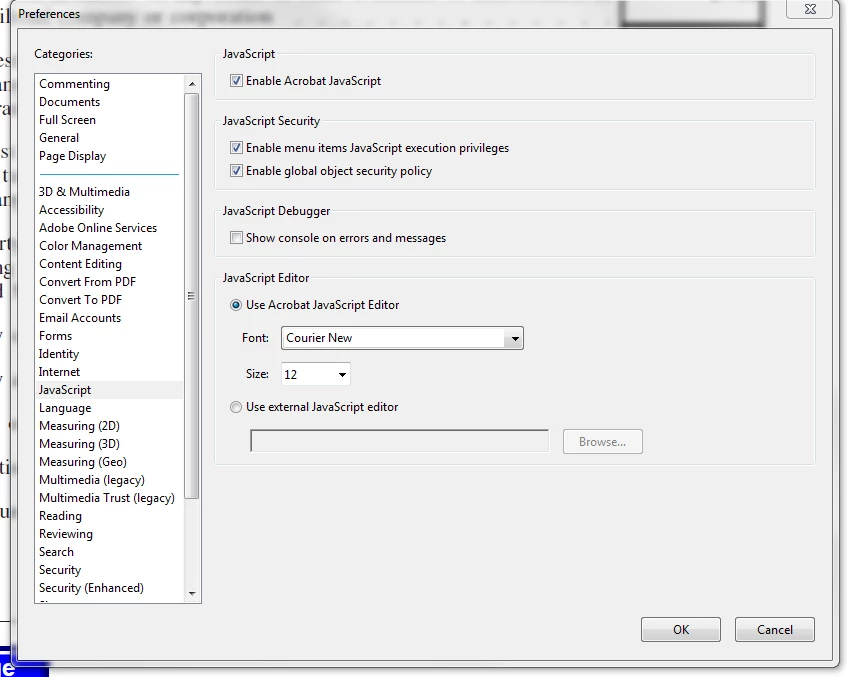
Is that only for PRO? What am i missing here?

(Windows 7 - and i am at my office)

Thanks in advance!

This topic has been closed for replies.
Correct answer try67

Acrobat Standard and Reader are very different. Acrobat has much more functionalities than Reader, including creating and editing PDF files in various ways. However, Acrobat Standard is more limited than Acrobat Pro, as the names suggest.

To achieve access to the JS Console there's no need for a registry edit. I wrote a script that allows you to access it via the menu bar.

All you have to do is create a new js file in the JavaScripts folder of the application with this code:

app.addMenuItem({ cName: "ShowConsole", cUser: "Show &JS Console", cParent: "Window", nPos: -1,

    cExec: "console.show()", cEnable: "event.rc = (true);"});

The next time you open Acrobat there will be a new menu item at the top of the Window menu that will launch the JS Console when clicked. You can even gain quick access to it using this key combination: Alt+W, J

Once the Console is opened you can use it just like in Acrobat Pro. This will even work in Reader, by the way.

2 replies

JR Boulay
Community Expert
Community Expert
December 28, 2016

Hi.

Yes, this is for the Pro version only.

To get the Console in Acrobat Standard you must use the "JavaScript Console for Adobe Reader 7.0" free utility, available on this page: Windjack Solutions, Inc. - Free Stuff

Acrobate du PDF, InDesigner et Photoshopographe
December 28, 2016

Thanks, i was wondering if this was the case. There were hints something changed with Reader X but i couldn't tell what, and i also couldn't tell which group Acrobat Standard fell into. Sounds like it falls into the same camp as Reader?

Im on my work computer so the registry edit piece of getting it working for Reader isnt particularly feasible for me.

Thanks for the guidance

try67
Community Expert
try67Community ExpertCorrect answer
Community Expert
December 28, 2016

Acrobat Standard and Reader are very different. Acrobat has much more functionalities than Reader, including creating and editing PDF files in various ways. However, Acrobat Standard is more limited than Acrobat Pro, as the names suggest.

To achieve access to the JS Console there's no need for a registry edit. I wrote a script that allows you to access it via the menu bar.

All you have to do is create a new js file in the JavaScripts folder of the application with this code:

app.addMenuItem({ cName: "ShowConsole", cUser: "Show &JS Console", cParent: "Window", nPos: -1,

    cExec: "console.show()", cEnable: "event.rc = (true);"});

The next time you open Acrobat there will be a new menu item at the top of the Window menu that will launch the JS Console when clicked. You can even gain quick access to it using this key combination: Alt+W, J

Once the Console is opened you can use it just like in Acrobat Pro. This will even work in Reader, by the way.

try67
Community Expert
Community Expert
December 27, 2016

What happens when you press Ctrl+J? Does the console window not open?

December 28, 2016

Correct nothing opens.