
Participant
July 14, 2021
Question

Al firmar con la firma certificada esta se desconfigura

  • July 14, 2021
  • 1 reply
  • 652 views

Buenas,

cuando intento firmar desde la herramineta Certificados en Adobe Reader, al principio todo va bien pero cuando guardo el archivo y vuelvo a abrirlo para verlo la firma me aparece desconfigurada y amontonada:
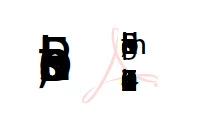


hemos probado de reinstalar, de eliminar plugins pero sigue pasando.


Hay alguna solución? 


Gracias, un saludo.


This topic has been closed for replies.

1 reply

Amal.
Community Manager
Community Manager
July 15, 2021

Hi Cristian


Hope you are doing well and sorry for the trouble. As described, when You save the file and reopen it to see it the signature appears unconfigured and stacked.


Is this a behaviour with a particular PDF file or with all the PDFs? Please try with a different PDF file and check.


What is the version of the Adobe Acrobat Reader you are using? To check the version of the application Go to Help > About Acrobat and make sure you have the latest version installed. Go to Help > Check for Updates and reboot the computer once.


Please try to repair the installation (Win only) from the help menu and reboot the computer once and check.


If it doesn't work, try to reset the Acrobat Preferences to default as described in the help page https://community.adobe.com/t5/acrobat/how-to-reset-acrobat-preference-settings-to-default/td-p/4792082 and check


You may also try to create a new test user profile with full admin rights in Windows or enable the root account in Mac and try using the application there and check.


Also, please try to sign the PDF online via Document Cloud https://documentcloud.adobe.com/link/home/ and see if that helps.


Regards

Amal