
Batch Folder Conversion of PDF to Word with Adobe Acrobat Pro 2017
From looking at other forum posts here, I've found the action wizard, and added the folder I wanted to modify. However, I don't see any way to export from PDF to Word. Only JPEG, PNG, and TIFF show up as export options.
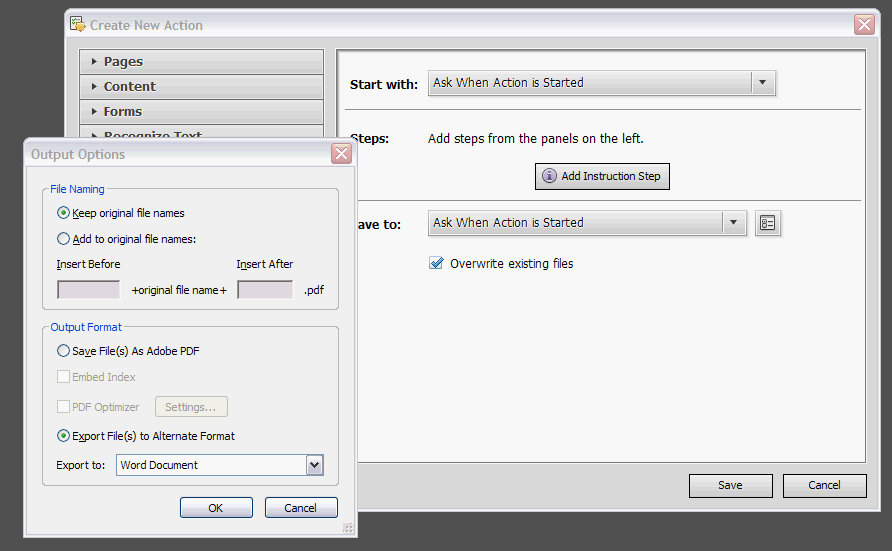
In https://community.adobe.com/t5/acrobat/batch-convert-pdf-to-word/m-p/4527671 a suggestion was to create a new action but not add any steps, and instead open the "Options dialogue for the Save To field". My problem is that this "Save To" field doesn't appear to exist on my version.
From the forum post:
From my computer:
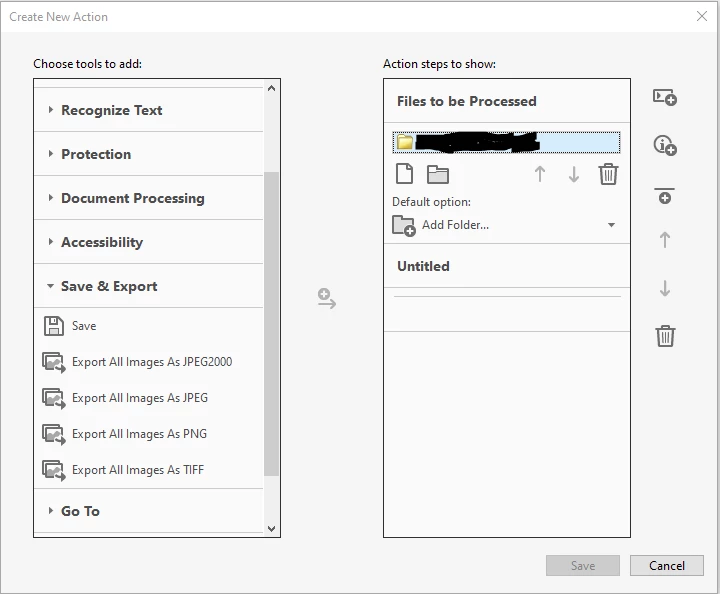
Other threads on this forum have been little help; all the ones I've found just culminated in the advice "Use the Action Wizard" but nothing about how to actually get the Action Wizard to convert specifically from PDF to Word. I don't see any such option. So how do I actually get this folder of PDFs to batch export/convert to Word?
 AdChoices