Inspiring
May 27, 2025
Question

어도비 전자 서명 진행 관련 문의

  • May 27, 2025
  • 1 reply
  • 780 views

현재 어도비 Pro 및 sign을 구독하여 사용중입니다. 


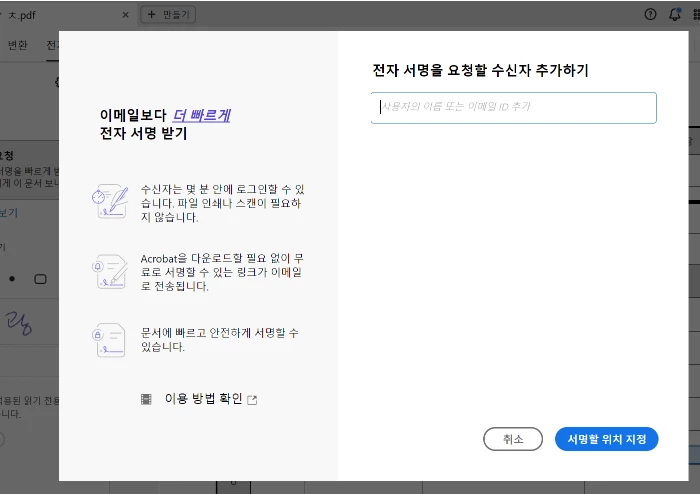
동일한 프로그램을 사용중인데도 전자 서명을 요청하는 절차가 컴퓨터 마다 다릅니다. 


PC 1 전자 서명 요청 화면 
 

PC2 전자 서명 요청 화면 
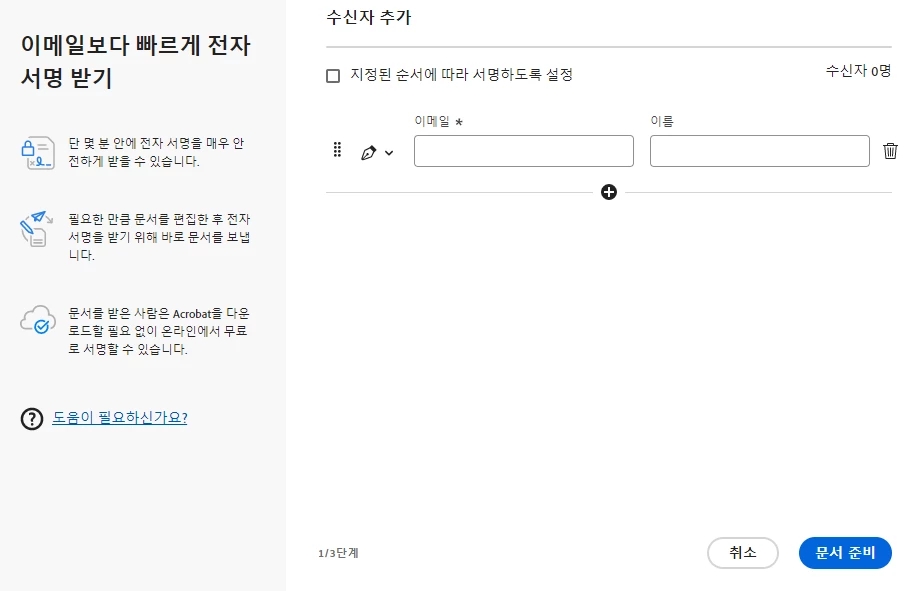
 

두 버전이 모두 유효한 것은 확인이 되었으나, PC2의 전자 서명 요청 화면을 사용하고 싶습니다. 


설정등을 어떻게 변경해야 PC1을 PC2 처럼 변경할 수 있나요?

 

1 reply

Meenakshi Negi
Community Manager
Community Manager
May 27, 2025

Hi Exquisite_Panther2322,


Thank you for reaching out.


Please confirm if you are signed in using the same credentials on both machines.

We will check with the team if it can be changed. 


Thanks,

Meenakshi


Inspiring
May 27, 2025

네 동일한 계정으로 로그인했습니다. 

Meenakshi Negi
Community Manager
Community Manager
June 23, 2025

확인 감사합니다.

그런데 화면 캡쳐 등을 통해 더 자세한 설정 경로를 알려주실 수 있을까요?


Hi Exquisite_Panther2322,


Sure, please take a look at the screenshot for the settings referred to.


1. In Acrobat, go to Preferences> Adobe Online Services. Make sure the “Use the legacy version of request e-signatures” checkbox is unchecked.


2. Go to registry path: Computer\HKEY_CURRENT_USER\Software\Adobe\Adobe Acrobat\DC\FillSign and check if bEnableNativeRS=1

- Use Windows+R keys on your keyboard to open the Run window and type in Regedit.

- In the Registry editor, go to HKEY_CURRENT_USER > Software > Adobe > Adobe Acrobat > DC > FillSign.

- Check if value bEnableNativeR is set to 1. 


Let us know how it goes.


Thanks,

Meenakshi