
Adobe Acrobat Pro (64-Bit) -- "Specify Where To Sign" Not Opening Next Window
Hey guys!
I've been battling this issue for about a week and haven't been able to resolve the issue
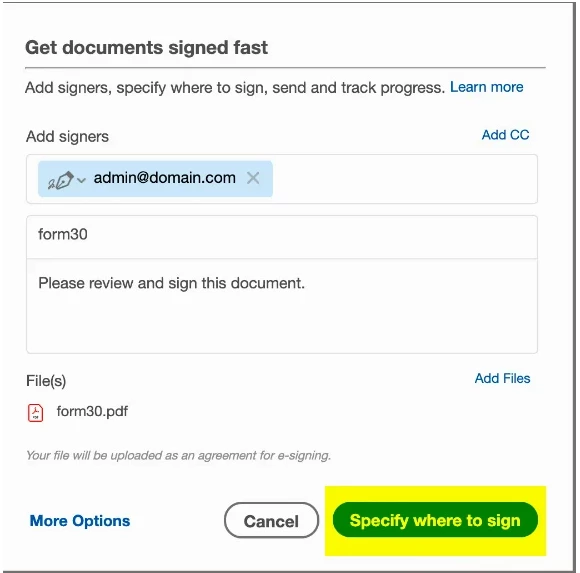
We have a client that needs to get a document e-signed by their clients. In order to get to "Request For E-Signature", they go to "E-Sign" and then "Prepare Agreement" > they select the form they need to use > they click on "Tools" > "Request E-Signatures" > a window opens that prompt to add recipients, and they click on "Specify Where To Sign", which is posted below:
After they click on "Specify Where To Sign", the window closes and they are brought back to the main document, however, they are now only able to add text or a Signature Line, and not a field prompting where an "E-Signature" can be prompted
I'm not too sure if we're using the program incorrectly, or if this is currently a known bug. We have tried two different computers, and on three different user profiles.
Here are the specifications of Adobe and the Windows version:
Windows Version - Windows 10 Enterprise 22H2 (64-bit) | All Windows Updates applied | Build Number: 19045.3324
Adobe Acrobat Pro (Creative Cloud) - 23.003.20269 | All Updates Applied
Any advice would be greatly appreciated!
 AdChoices