
Participant
January 25, 2017
Answered

Adobe Sign and Google Drive

  • January 25, 2017
  • 8 replies
  • 18209 views

The Adobe Sign feature list says that all versions support "Send, track, and manage directly from your online Box or Google Drive account". Where are the configuration instructions for Google Drive? I see nothing in the help or forums.
This topic has been closed for replies.
Correct answer AadeshSingh

Hi williamb15299553​,

Yes, you can integrate Box or Google Drive account with your Adobe Sign account.

Login to your Adobe Sign account using the below link:

- Sign In — e-signature and e-sign Software Solution — Adobe Sign 

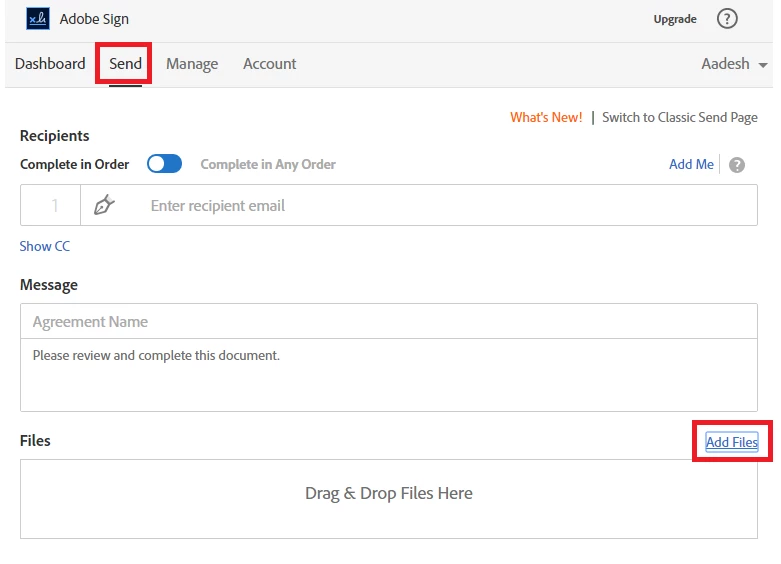
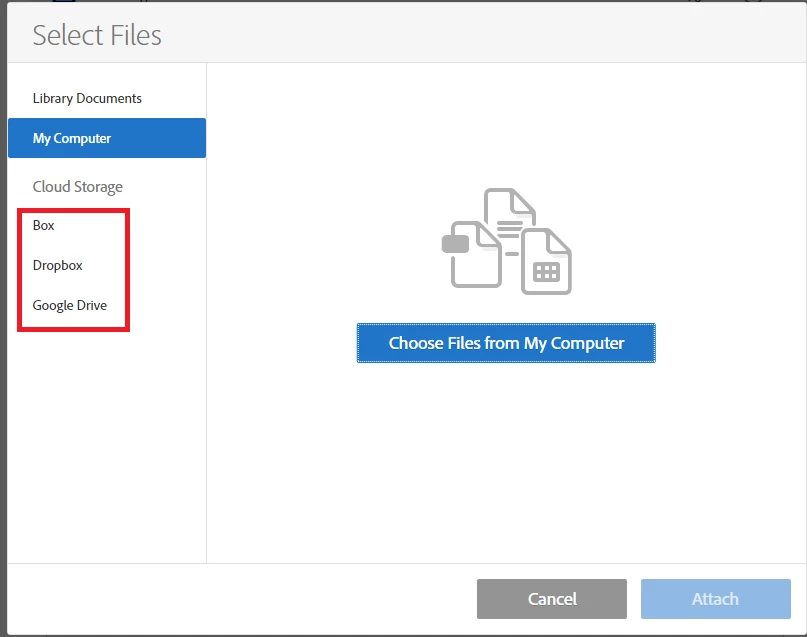
Navigate to Send Page -> Add files -> Select the account you want to integrate and login with the account details to complete the integration. 

Regards,

Aadesh

8 replies

Participant
March 16, 2021

I have a similar issue. We curently use Dropbox and I can go in through Dropbox, share document, use Adobe Sign and once the file it sent, it asks where I would like the file to be saved once signed in dropbox. 

We are looking to move to Good Drive and I can not find a similar feature to save the documents in Good Drive.

Can anyone help?

Known Participant
October 25, 2021

I would also like to integrate our Google Drive account with our Adobe Sign Enterprise account. Can we set up folders within Google Drive so that signed PDFs from webforms can automatically store in Google Drive with an assigned folder? Are there any APIs that help with this sort of automatic storage? 

Participant
August 17, 2020

I was testing out functionality on a shared Adobe Sign account and connected it to my Google Drive to see the functionality, but now I can't figure out how to remove it (since it's a shared account). Please advise.

brittanyr22854763
Participant
April 3, 2019

Can you access Google Team Drive files?  I having trouble doing this from Adobe Sign.  I can access non Team Drive files, but when I search for a file name that is in a Team Drive, it doesn't come up.

sameer_puri
Adobe Employee
Adobe Employee
December 3, 2018

Hello All,

The issue "Sign in with Google temporarily disabled for this app" should be fixed now. Please give it a try and let us know any issue (with screenshots) you might face while trying this workflow.

Thanks

Sameer Puri

Participant
January 11, 2019

I have a similar problem. I have linked my google drive account but when i click to access a file i get a big blank white square and nothing else. Please advise?

Meenakshi Negi
Legend
January 14, 2019

Hi Matthewc,

As you have mentioned above, you get the blank window when you select the Google Drive to add a document.

Please try once to clear the cache and cookies of the browser.

Try to open the application on an alternate browser or the new incognito window on Chrome.

Let us know if you still experience the issue.

Regards,

Meenakshi

Participant
September 24, 2018

Also having this problem, any status at this point?

darrenl29652688
Participant
June 20, 2018

Tried to connect my Google Account and received the following error, "Sing in with Google temporarily disabled for this app...This app has not been verified yet by Google in order to use Google Sign In."

sameer_puri
Adobe Employee
Adobe Employee
June 20, 2018

Hi,

We are aware of this issue. This is due to a change at Google's end and we have already filled a form with Google to get this working again. Unfortunately, At the moment, there is no workaround available for the issue. Will update the thread once the issue is fixed.

Thanks

Sameer Puri

justint17796782
Participant
August 21, 2018

Any updates?

Participant
January 10, 2018

Hi William.

Did this work for you?  I would like this feature as well.

Chris

Participant
May 16, 2018

In my experience, this allowed me to use a Google Drive file in Adobe Sign, but I wouldn't call it a full integration. The AS document does not live in Google Drive as it makes its way through the workflow. The final document also does not appear in Google Drive. If I'm missing something here, I'd love to know how to make the full integration happen!

Participant
May 26, 2020

same here, any answer to this?

AadeshSingh
AadeshSinghCorrect answer
Participating Frequently
January 28, 2017

Hi williamb15299553​,

Yes, you can integrate Box or Google Drive account with your Adobe Sign account.

Login to your Adobe Sign account using the below link:

- Sign In — e-signature and e-sign Software Solution — Adobe Sign 

Navigate to Send Page -> Add files -> Select the account you want to integrate and login with the account details to complete the integration. 

Regards,

Aadesh