
MikeMazzEAS
Participant
March 5, 2019
Answered

adobe sign - cannot find or delete 'adobe sign templates'

  • March 5, 2019
  • 1 reply
  • 860 views

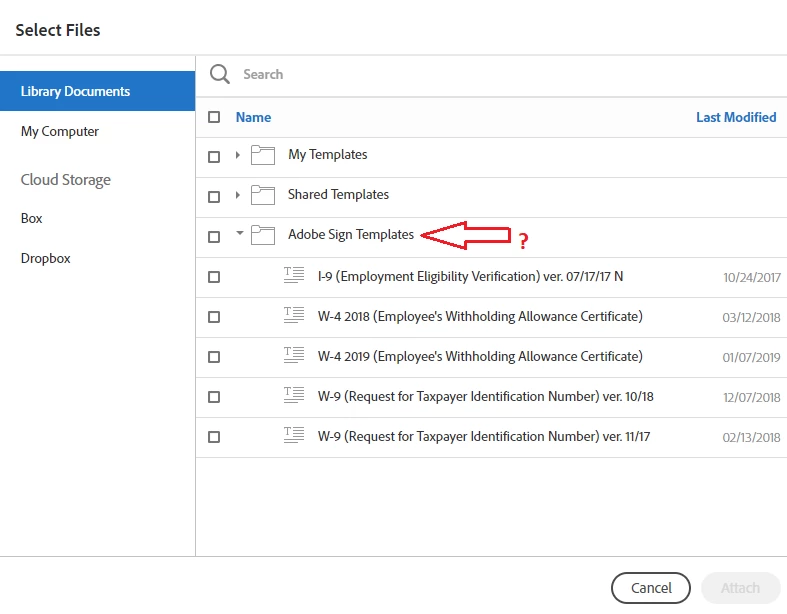
hello, having an issue here, I can create and delete templates in adobe sign with no issue. but when i go to send something out, and choose from the library, there is this section called Adobe Sign templates that i can't seem to locate anywhere. i want to delete these as they are old and outdated but cannot find where they are located so i can delete them.
    This topic has been closed for replies.
    Correct answer Meenakshi Negi

    Hi MikeMazzEAS,

    There is no option to delete the Adobe Sign templates that you are referring to.

    However, you can hide those templates from that list. Please refer to the steps provided below:

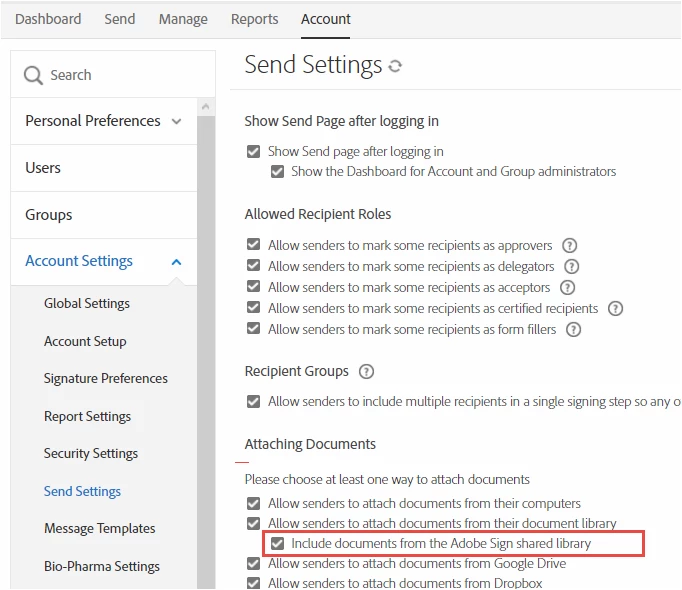
    - In Adobe Sign, go to Account tab > Account settings > Send settings.

    - Under "Attaching Documents", uncheck the box for "Include documents from the Adobe Sign shared library".

    - Click on "Save" to save the changes.

    Hope that helps.

    Let us know if you have any question or need help.

    Regards,

    Meenakshi

    1 reply

    Meenakshi Negi
    Meenakshi NegiCorrect answer
    Legend
    March 5, 2019

    Hi MikeMazzEAS,

    There is no option to delete the Adobe Sign templates that you are referring to.

    However, you can hide those templates from that list. Please refer to the steps provided below:

    - In Adobe Sign, go to Account tab > Account settings > Send settings.

    - Under "Attaching Documents", uncheck the box for "Include documents from the Adobe Sign shared library".

    - Click on "Save" to save the changes.

    Hope that helps.

    Let us know if you have any question or need help.

    Regards,

    Meenakshi