
Participant
January 21, 2019
Answered

ADOBE SIGN DASHBOARD

  • January 21, 2019
  • 2 replies
  • 3197 views

I am unable to find the adobe sign dashboard to manage my documents.  It used to be readily accessible, but now with changes is not.  Where is the link?  I want to manage my documents and not just see individual documents that need a password.  Help.
This topic has been closed for replies.
Correct answer Meenakshi Negi

Hi Gloriag,

As you need to manage the documents, please refer to the steps mentioned below:

- Open this link Adobe Document Cloud and sign in with your Adobe ID.

- Then go to Shared > For Signature.

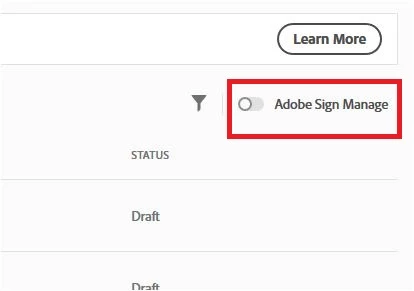
- Enable the Adobe Sign Manage tab at the right-hand side of the window. It will redirect you to the old manage page where you can manage your documents.

Let us know if you need any help.

Regards,

Meenakshi

2 replies

Participant
December 18, 2019

Hi there,


I tried to follow these steps and see everything except that option to turn it on. Is there another way to get the dashboard?


Thank you,


Sarah

Meenakshi Negi
Meenakshi NegiCorrect answer
Legend
January 22, 2019

Hi Gloriag,

As you need to manage the documents, please refer to the steps mentioned below:

- Open this link Adobe Document Cloud and sign in with your Adobe ID.

- Then go to Shared > For Signature.

- Enable the Adobe Sign Manage tab at the right-hand side of the window. It will redirect you to the old manage page where you can manage your documents.

Let us know if you need any help.

Regards,

Meenakshi