Participant
March 9, 2023
Answered

AdobeSign in Microsoft Power Automate - invalid document/agreement id, unauthorized user

  • March 9, 2023
  • 1 reply
  • 2376 views


Hi,


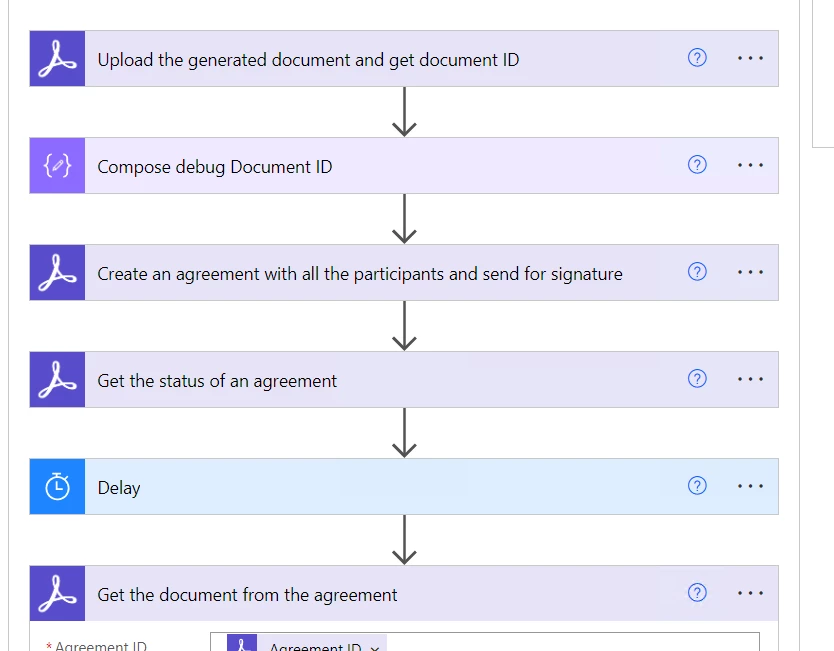
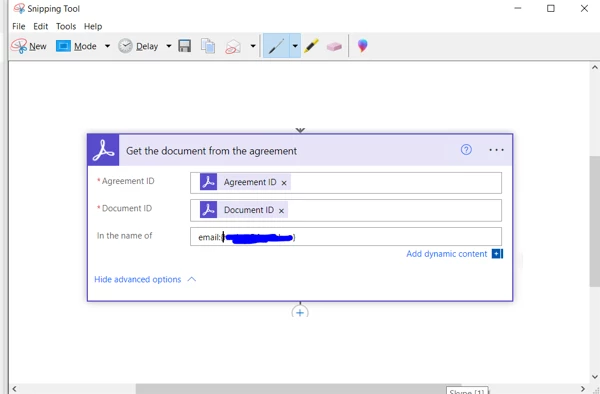
I don't know why it's not working. Until my action: Get a document from an agreement my flow works just fine. I tried first not providing anything in the email field, then tried with an email with or without {}. The email is from an adobe sign user (as expected). If I don't put anything in the field "In the name of" then I get invalid document ID. The document Id is the same that is created when uploaded my doc before creating the agreement. 


Does anyone have a solution to make the below action work?


Thank you a lot!


Correct answer SimonATS

@SimonATS  Thank you for your response! I added the dynamic value of the Sender but it is the same I putted there in the first place. I've added the same value for 'In the name of' also to the actions: Upload and Create agreement as in the picture below:
The sender is the owner of the account and "I'm the robot". Please advize on how to authorize as everything else I've tried.

Thank you so much!


Actually forget about all that. You are using the wrong action. You want to use the 'get Pdf from a signed agreement'. Even if the agreement has not been signed it still should give you a pdf.

The document id in the 'Get document from the agreement', is not  the same ID that is created when uploaded my doc before creating the agreement. To use this action you first need to add the action "Get a list of all the document IDs from an agreement" 

As an agreement can have multiple document, this action returns an array of IDS. So if you are just after the combined PDF, use the 'get Pdf from a signed agreement'. which only needs the agreementID.

Overall though, unless you have a specifc need for the unsigned agreement, it's better to use a second flow to check the staus and grab the signed PDF. Create a new flow and use the Sign trigger 'When an agreement workflow is completed'.

 

1 reply

Participant
March 10, 2023

@SimonATS Can you help, please?

Thank you!

Community Manager
March 10, 2023

the syntax for the the 'In the name of' is indeed:

'email:myemail@email.com' (without quotes).

The email address bus be the owner of the agreement, in other words the sender. You can add that as a dynamic value from a get document status action.


the sender needs to also be a user in the same Sign account as the user who has authroised the Sign connector. 

Alternatively ensure the Sign connector is authorised by the same user who has send the agreement.


Participant
March 10, 2023

@SimonATS  Thank you for your response! I added the dynamic value of the Sender but it is the same I putted there in the first place. I've added the same value for 'In the name of' also to the actions: Upload and Create agreement as in the picture below:

The sender is the owner of the account and "I'm the robot". Please advize on how to authorize as everything else I've tried.

Thank you so much!