
Exit
  • Global community
    • Language:
      • Deutsch
      • English
      • Español
      • Français
      • Português
  • 日本語コミュニティ
  • 한국 커뮤니티
1

Completed Notification Emails - Signed and Filled

New Here ,
Jul 10, 2017 Jul 10, 2017

I am looking to have the completed notification emails disabled or have the completed PDF's not be attached to the emails.

The PDF's, once filled out, contain sensitive user data. We do not want these completed PDF's sent in any email.

By default, once a PDF has been filled out and signed by the recipient, the recipient and sender both receive emails with the completed PDF attached. I have found in the account settings where the email to the sender can be disabled, but not for the recipient.

Can these emails be disabled for both sender and recipient? If no, Can the completed PDF not be attached to the notification email?

If no to both, is there any option for sensitive data fields? Where the field is known to contain sensitive info and would not be shown/decrypted?
9.0K
Translate
Report
Community guidelines
Be kind and respectful, give credit to the original source of content, and search for duplicates before posting. Learn more
community guidelines

correct answers 1 Correct answer

Adobe Employee , Jul 12, 2017 Jul 12, 2017

Greetings!

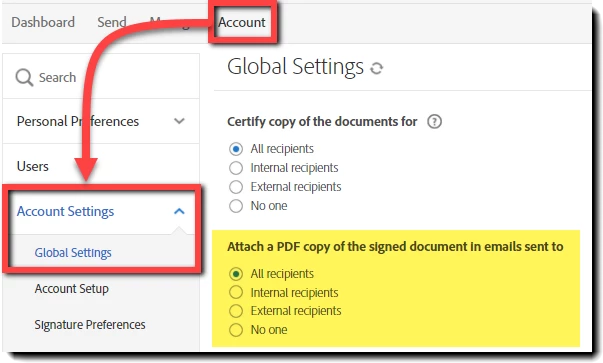
The ability to manage the PDF distribution in the Signed and Filed email is available to Team, Business and Enterprise levels of service.  This option is not present in the Individual package.

The setting can be found by navigating to: Account > Account Settings > Global Settings

To Michael's point - "I would hope that the signer of any contract would be able to have a copy of the contract"

For customers that elect to not attach a PDF to the Signed and Filed email, it's worth noting that

...
Translate
LEGEND ,
Jul 10, 2017 Jul 10, 2017

The model for Adobe Sign is that of contract signing. I would hope that the signer of any contract would be able to have a copy of the contract signed.

Translate
Report
Community guidelines
Be kind and respectful, give credit to the original source of content, and search for duplicates before posting. Learn more
community guidelines
Adobe Employee ,
Jul 12, 2017 Jul 12, 2017

Greetings!

The ability to manage the PDF distribution in the Signed and Filed email is available to Team, Business and Enterprise levels of service.  This option is not present in the Individual package.

The setting can be found by navigating to: Account > Account Settings > Global Settings

To Michael's point - "I would hope that the signer of any contract would be able to have a copy of the contract"

For customers that elect to not attach a PDF to the Signed and Filed email, it's worth noting that any recipient can register their email address for Free, and have direct access to the authoritative original.

Translate
Report
Community guidelines
Be kind and respectful, give credit to the original source of content, and search for duplicates before posting. Learn more
community guidelines
Community Beginner ,
Mar 23, 2020 Mar 23, 2020
LATEST

Hi Scott,

we have the same issue and already found the option in the settings that the signed document is not sent via e-mail attachment. But when we tried it out we found out, that an e-mail is sent as confirmation that the document is signed. And this e-mail contains a link to the signed document. The link is not encrypted in any way, so anyone who gets access to this e-mail is able to see the document which contains sensitive information. So this is not secure regarding data protection. Do you have an idea how to handle this and avoid that the link is freely accessable?

Please also see my post:

https://community.adobe.com/t5/adobe-sign/what-s-the-best-practice-approach-using-adobe-sign-to-sign...

Thanks in advance,

Yvonne

Translate
Report
Community guidelines
Be kind and respectful, give credit to the original source of content, and search for duplicates before posting. Learn more
community guidelines