
Mystical_Wizard5DE5
Participant
February 11, 2019
Answered

Customer Support HELP!

  • February 11, 2019
  • 1 reply
  • 1876 views

Good morning,

Does anyone know how to contact customer support to actually speak to a person? I have spent hours trying to find tutorials on their page for AdobeSign, but I'm unable to find the answer to my question.

I would like to find out more information on the possibility of signing multiple documents in one transaction. Are we able to send more than one document at once and receive each signed document back individually? So that each document has verifiable signatures. This is so we are within the requirements of the law for the retention of  document types and electronic signatures. Right now we are receiving one long PDF with signatures, but we are unable to extract each individual document for distribution and retention. Let me know if my inquiry requires clarification, or what information you may need in order to assist me.

Thank you!
This topic has been closed for replies.
Correct answer Meenakshi Negi

Hi Lizbethc,

As you have mentioned above, you need to send the multiple documents at once for signature and receive each document separately.

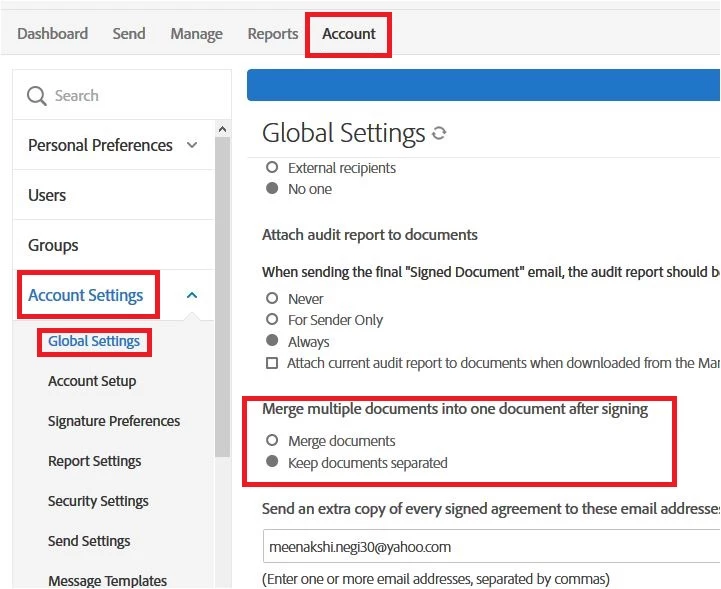
For that, you need to enable the option "Keep documents separated" in the Account settings.

Refer to the steps provided below:

- Log in to Adobe Sign account using this link Sign In — e-signature and e-sign Software Solution — Adobe Sign

- Go to Account tab > Account Settings > Global Settings.

- Select the Radio button for "Keep documents separated" under the option "Merge multiple documents into one document after signing".

Hope that helps.

Also, as you need to contact the support team, take help of the steps mentioned below:

• Login to your Adobe Sign account directly via Sign In — e-signature and e-sign Software Solution — Adobe Sign

• Once logged in, check the upper right corner of the page and click the question mark icon.

• It will re-direct you to the page where you get the option to create the support case or to start a chat with the team.

• If you've never logged in this way, use the forgot password option on the login link to set your password.

Let us know if you need any help.

Regards,

Meenakshi

1 reply

Meenakshi Negi
Adobe Employee
Meenakshi NegiCorrect answer
Adobe Employee
February 11, 2019

Hi Lizbethc,

As you have mentioned above, you need to send the multiple documents at once for signature and receive each document separately.

For that, you need to enable the option "Keep documents separated" in the Account settings.

Refer to the steps provided below:

- Log in to Adobe Sign account using this link Sign In — e-signature and e-sign Software Solution — Adobe Sign

- Go to Account tab > Account Settings > Global Settings.

- Select the Radio button for "Keep documents separated" under the option "Merge multiple documents into one document after signing".

Hope that helps.

Also, as you need to contact the support team, take help of the steps mentioned below:

• Login to your Adobe Sign account directly via Sign In — e-signature and e-sign Software Solution — Adobe Sign

• Once logged in, check the upper right corner of the page and click the question mark icon.

• It will re-direct you to the page where you get the option to create the support case or to start a chat with the team.

• If you've never logged in this way, use the forgot password option on the login link to set your password.

Let us know if you need any help.

Regards,

Meenakshi

Mystical_Wizard5DE5
Participant
February 12, 2019

Hi,

I followed the instructions provided, but it did not fix the issue. The documents are being sent to multiple signers for agreements/documents approved at a meeting.

Thanks!

Meenakshi Negi
Adobe Employee
Adobe Employee
February 12, 2019

The option "keep documents separated" works only when you send multiple documents to a user.

Could you please how exactly you are sending the documents to the signers?

Are you using the Mega Sign option to send the document?

Regards,

Meenakshi