
Participant
January 6, 2023
Answered

Different Logo for different groups in the Account

  • January 6, 2023
  • 2 replies
  • 707 views

We already have a logo that our company is using however since we have different groups in our Accounts other groups would like to use a logo specific to their group. Is it possible to use different logos per group or per template?
This topic has been closed for replies.
Correct answer anas-ensemble

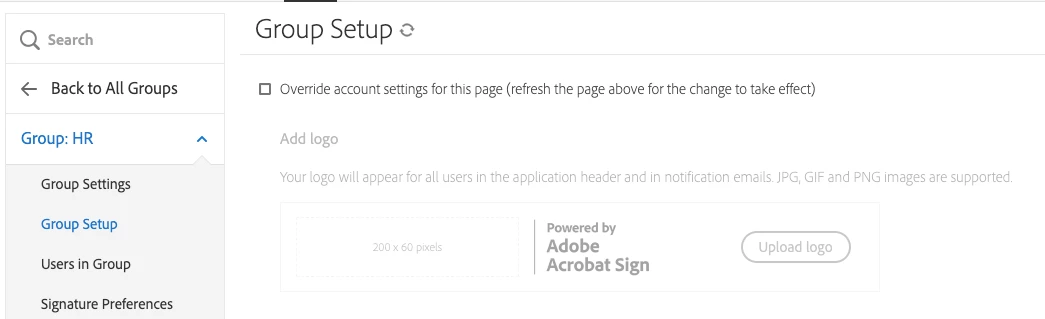
Hi Mark! An Admin will be able to configure the settings for the logo:

Select the Group > Group Setup > check the checkbox to override the account settings and then add the logo.


2 replies

Meenakshi_Negi
Legend
January 10, 2023

Hi Mark27823106hrt5,


Thank you for reaching out.


As anas-ensemble mentioned, you may change the logo for each group from the settings for that group.

For more information, you may refer to the following help user guide for Acrobat Sign: https://helpx.adobe.com/sign/user-guide.html

Let us know if we can be of any help.


Thanks,

Meenakshi

Participant
January 10, 2023

Thank you this is really helpful!

anas-ensembleCorrect answer
Inspiring
January 6, 2023

Hi Mark! An Admin will be able to configure the settings for the logo:

Select the Group > Group Setup > check the checkbox to override the account settings and then add the logo.


Participant
January 24, 2023

Hello @anas-ensemble, I configured the group based on your instruction, however, when I tested it, the email that I received still shows the old logo even though the "send on behalf of" is the User which is part of the group with an updated logo do you have any idea what is missing?