
Participant
December 22, 2022
Answered

Email From Adobe (Is it Legit?)

  • December 22, 2022
  • 4 replies
  • 28848 views


Note from moderator: moved to Adobe Sign by request of OP. 


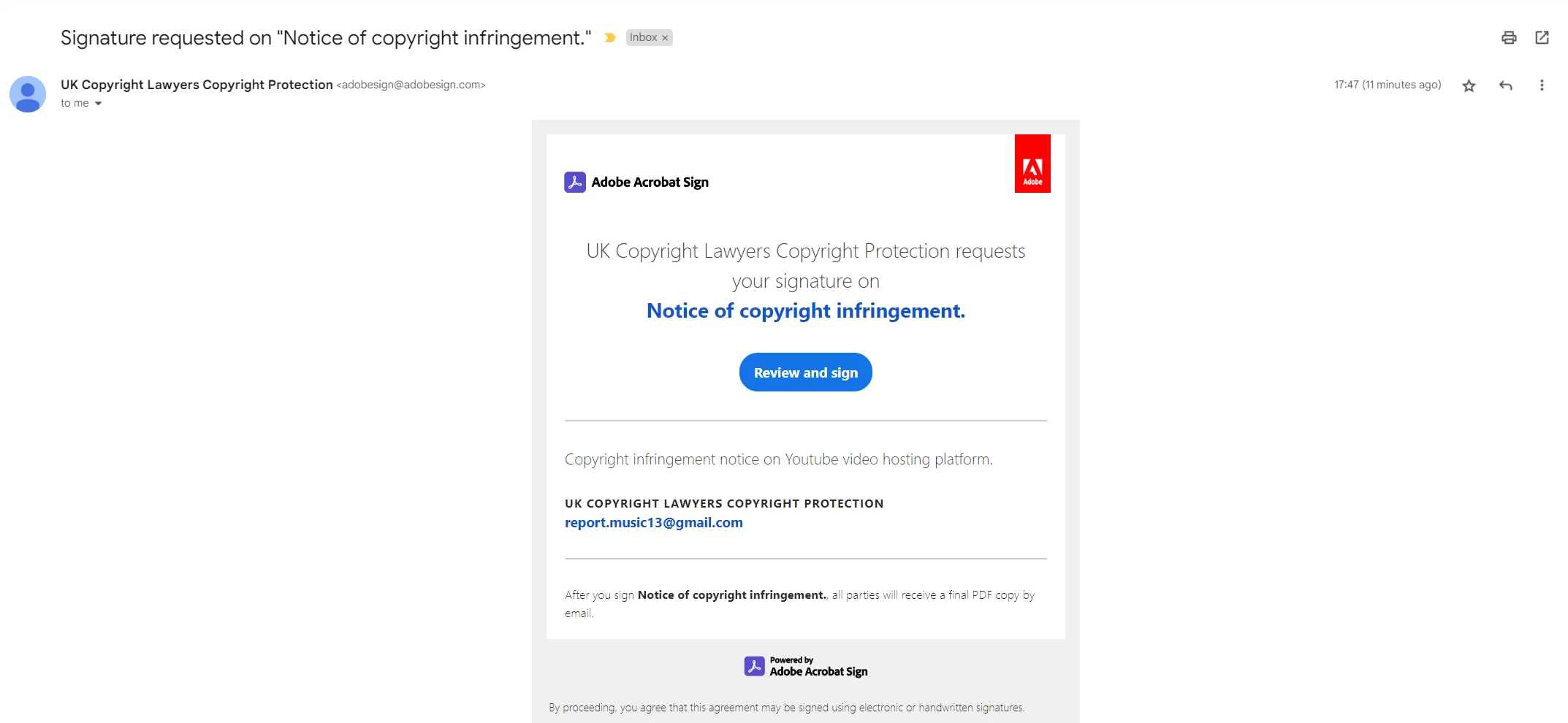
I recently got an email from adobe and I am wondering if the email is legit


This is the email: adobesign@adobesign.com


They sent me a copyright infringement and I'm wondering if this is legit or not?


Please let me know, I also attached an image as well
Correct answer Meenakshi Negi

Hi sureshc41999868,


Thank you for reaching out, and sorry for the delay in response.


Please check the email address of the "Contract Pro" mentioned. You can check it at the bottom of this page or by clicking on the Contract Pro at the top. It will show all the email addresses. 

Did you apply for any service? As it is a Microsoft service, it should come from Microsoft's company email address.


Share the precise and complete image of the email received. Share the email address from which it was received, as it is not visible in the screenshot. 


If you find it spam, please refer to the information on this page: https://helpx.adobe.com/sign/using/adobesign-report-abuse.html


Thanks,

Meenakshi


4 replies

Meenakshi Negi
Community Manager
Community Manager
December 23, 2022

Hi DriveToward24839105kf5d,


Thank you for reaching out.


It seems that the document was sent from report.music13@gmail.com using Adobe Acrobat Sign.

If you do not know the sender and find it a fraud email, use the "Report Abuse" option at the bottom of the email. 

The team will get the information and will act on it.


Let us know if we can be of any help.


Thanks,

Meenakshi

Participant
June 7, 2024

@Meenakshi Negi 
Hi Meenakshi,
We got this email to 15+ end users yesterday, do you think this is legitimate or spam?
Attached screenshot for your reference.
Regards

Suresh

Meenakshi Negi
Community Manager
Meenakshi NegiCommunity ManagerCorrect answer
Community Manager
July 1, 2024

Hi sureshc41999868,


Thank you for reaching out, and sorry for the delay in response.


Please check the email address of the "Contract Pro" mentioned. You can check it at the bottom of this page or by clicking on the Contract Pro at the top. It will show all the email addresses. 

Did you apply for any service? As it is a Microsoft service, it should come from Microsoft's company email address.


Share the precise and complete image of the email received. Share the email address from which it was received, as it is not visible in the screenshot. 


If you find it spam, please refer to the information on this page: https://helpx.adobe.com/sign/using/adobesign-report-abuse.html


Thanks,

Meenakshi


Nancy OShea
Community Expert
Community Expert
December 23, 2022

I'm not sure you can dismiss this without further investigation. 


1. Why would a phishing attempt go to all the trouble of using Adobe Sign document service to contact you? 


2.  Copy infrigment on YouTube video hosting platform. 

YouTube is owned by Google. 

Do you post media on YouTube?  Have you violated someone's copyright? Has YouTube been in touch with you?


Nancy O'Shea— Product User & Community Expert
CabeoC
Participant
July 31, 2024
  1. Reason why is because the email would come from the legitimate AdobeSign.com domain with a link on the Adobe.com domain, meaning it will not be blocked by your spam filter. Malicious actors are increasingly using legit services that won't get blocked by spam filters to share or link to their malicious content.
  2. Google copyright infringement emails come from a Google domain. They do not use Adobe Sign to send those notifications.
kglad
Community Expert
Community Expert
December 22, 2022

no.  that gmail address is a telltale sign of phishing.


you can click the link (but do not send), just to see inspect the recipient address.  post it here.


<moved from using the community >

jane-e
Community Expert
Community Expert
December 22, 2022

@DriveToward24839105kf5d 


I'm not sure, but it looks suspicious with that gmail address. Send it as an attachment to phishing@adobe.com. Usually you can do this by dragging the suspicious email into a new email. This is better than forwarding, as it includes more information.


How do I report an email, website or pop-up window that falsely claims to represent Adobe?


https://helpx.adobe.com/security/alertus.html


Jane

Forum volunteer


Participant
December 22, 2022

I just did that, thanks a lot, the scams are getting better and better these days...


jane-e
Community Expert
Community Expert
December 23, 2022

I'm first time using this community, can you move my post there?


@DriveToward24839105kf5d wrote:

I'm first time using this community, can you move my post there?


Done.


I see that an employee from the Adobe Sign team responded an hour after your post was moved and has given us the correct answer (and verified what I suspected.)


Jane