Participant
January 3, 2024
Question

Email verification incorrect

  • January 3, 2024
  • 4 replies
  • 1048 views

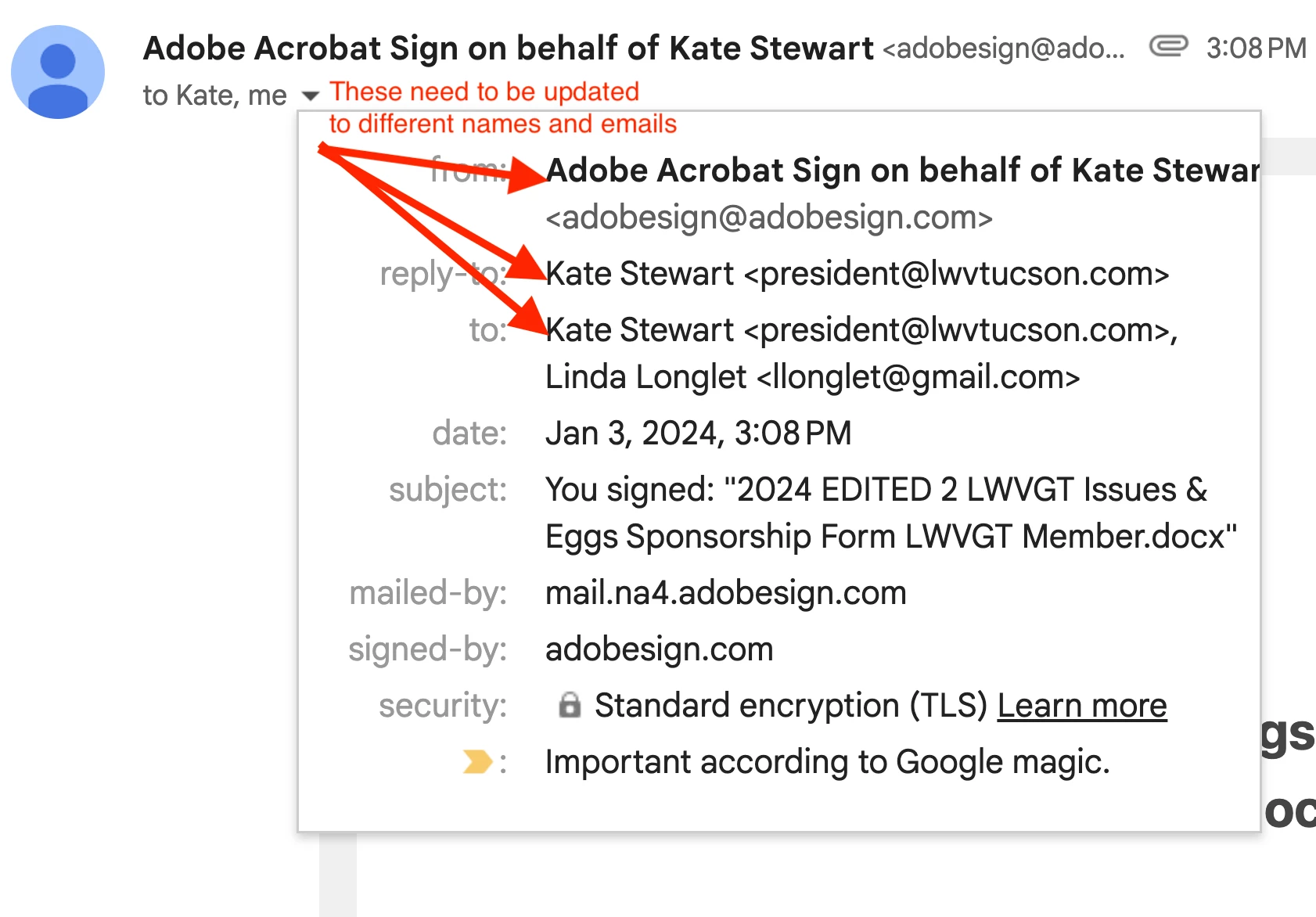
I have website form in Adcrobat and after completing the form, I received my email verification. BUT, the form is showing the incorrect 'FROM' and 'TO' information.  How do I correct this?
    This topic has been closed for replies.

    4 replies

    Participant
    October 18, 2024

    I’ve had my fair share of headaches with incorrect 'From' and 'To' fields too. Just recently, I sent out a newsletter, and it turned out that the verification showed my old email address as the sender—so embarrassing! I think it would help to double-check if the email addresses are clean before sending. I’ve been using this EMAIL CHECKER TOOL (link removed), and it’s been a lifesaver for me. It helps catch those pesky typos and invalid emails.

    Participant
    September 12, 2024

    I had a pretty similar issue with email forms before. I was getting the right verification emails but noticed that the 'FROM' and 'TO' fields were all mixed up. What helped me was checking the email settings in the form builder and making sure everything was configured correctly.

    Participant
    September 21, 2024

     Also, I used bulk email checker (link removed) to ensure that all the email addresses involved were valid and correctly formatted, which helped avoid some of the issues with incorrect addresses. Double-check your form settings and email configurations; that usually clears things up.

    Meenakshi Negi
    Legend
    January 7, 2024

    Hi LWVGT,


    Thank you for reaching out.


    As mentioned above, the email verification shows the incorrect 'From' and 'To' fields. Would you mind sharing more information on what is not correct in these fields? 

    Let us know how the document was sent and the recipients you added before sending it. The information will help us to understand what is not working correctly. 


    Thanks,

    Meenakshi


    jane-e
    Community Expert
    Community Expert
    January 3, 2024

    @LWVGT 


    I've moved your post to Adobe Acrobat Sign from Using the Community (for questions about the forums).


    Jane

    LWVGTAuthor
    Participant
    January 4, 2024
    Jane,

    Thank you for moving my post....how do I access it?

    Linda at LWV Tucson
    jane-e
    Community Expert
    Community Expert
    January 4, 2024

    @LWVGT 


    You just did! 😊


    Here's the direct link to this post:

    https://community.adobe.com/t5/user/viewprofilepage/user-id/34580718


    Here's the link to your page:

    https://community.adobe.com/t5/user/viewprofilepage/user-id/34580718


    In the upper right of the forum, click the bell to see your messages and replies. Click your avatar to see your profile or manage your account.


    The forum sends email unless you turn it off. You can reply to messages by email, but the forum will remove attachments and you need to remove PII.
