s47285714
Participating Frequently
February 18, 2017
Answered

Follow up question to Adobe Sign Passwordd protected file sent for signature-password didnt work

  • February 18, 2017
  • 1 reply
  • 1256 views

On my "Get a document signed" screen, I do not have the fields indicated

in your link:  How to encrypt your documents using Adobe Sign

Please provide the link for getting to the "Get Document Signed".  I am in Adobe Sign. There is a box for Password Protect but that only requires a password when the document has been signed and is returned to me.

This topic has been closed for replies.
Correct answer AadeshSingh

Please respond.

From: Sharon Wallace

Sent: Tuesday, February 21, 2017 1:12 PM

To: 'jive-2056149615-5nlx7-2-5kbnq@adobe-v8.hosted.jivesoftware.com' <

jive-2056149615-5nlx7-2-5kbnq@adobe-v8.hosted.jivesoftware.com>

Subject: RE: Follow up question to Adobe Sign Passwordd

protected file sent for signature-password didnt work

Importance: High

Just resent the screenshot. Here is Adobe's issue: the help tutorial you

sent me (twice) is outdated. The fields next to email address no longer

have functionality to to choose a method of identity verification. There is

only the "Password" box. This password does not require the

recipient/signer to enter a password before the pdf document can be opened.

The password is ONLY required once the signer has signed the document and

returned it to the sender. You need to correct the functionality of Adobe

Sign to allow for password protection of the unsigned document being sent

to the signer/recipient. The tutorial version that you forwarded to me

(twice) seemed to provide for this. The current program functionality does

not allow for this and needs to be corrected. Please advise.

From: AadeshSingh [mailto:forums_noreply@adobe.com

<forums_noreply@adobe.com>]

Sent: Tuesday, February 21, 2017 1:02 PM

To: Sharon Wallace <sharon@wallacecpas.com>

Subject: Follow up question to Adobe Sign Passwordd

protected file sent for signature-password didnt work

Follow up question to Adobe Sign Passwordd protected file sent for

signature-password didnt work

created by AadeshSingh <https://forums.adobe.com/people/AadeshSingh> in *Adobe

Sign* - View the full discussion

<https://forums.adobe.com/message/9346310#9346310>


Hi s47285714

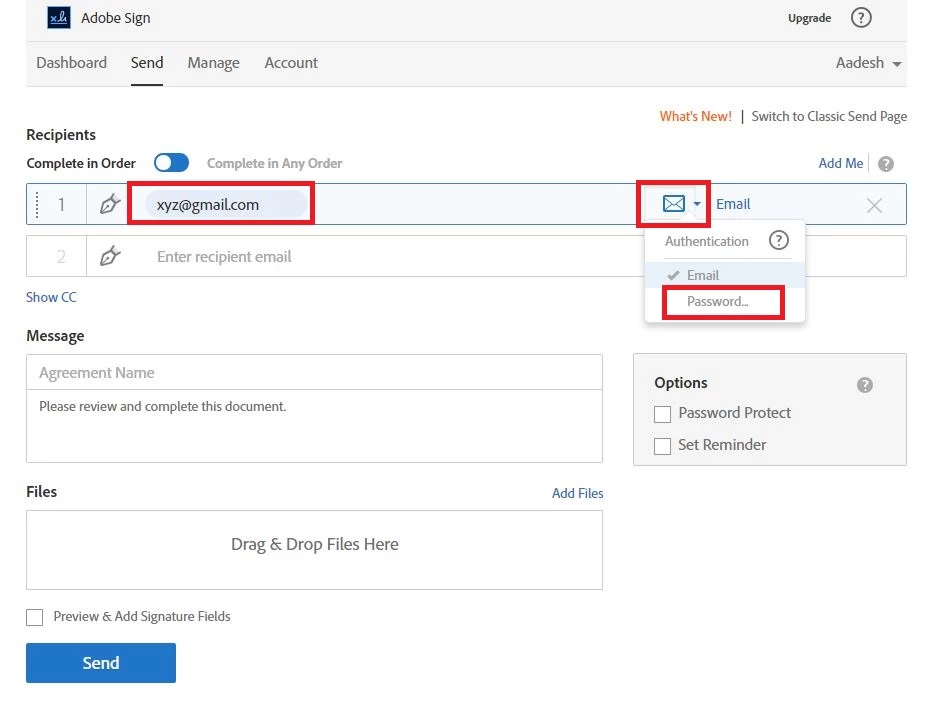
Please add your email address in the Recipient field, then you will be a envelop symbol where you will get the option to set "Identity verification" password.

Regards,
Aadesh

1 reply

AadeshSingh
Participating Frequently
February 19, 2017

Hi s47285714​,

Have you set "Verify signer identity using a password" on the document before sending it out for Signature?

Regards,

Aadesh

s47285714
s47285714Author
Participating Frequently
February 20, 2017

Hi Aadesh,

I log onto adobe.com. I click on the selection "Get a Document Singed"

which takes me to the Adobe Sign page. The screen that then appears before

me is as follows:

As you can see above, I do not have the "Identification Verification "

Option as your link had provided. I only have the" password protect" option

and that does not require a password from the signer. PLEASE provide me

with instructions on how to access the adobe page that DOES provide the

"Identity Verification" field.

From: AadeshSingh

Sent: Sunday, February 19, 2017 10:16 AM

To:

Subject: Follow up question to Adobe Sign Passwordd

protected file sent for signature-password didnt work

Follow up question to Adobe Sign Passwordd protected file sent for

signature-password didnt work

created by AadeshSingh <https://forums.adobe.com/people/AadeshSingh> in *Adobe

Sign* - View the full discussion

<https://forums.adobe.com/message/9341482#9341482>

AadeshSingh
AadeshSinghCorrect answer
Participating Frequently
February 23, 2017

Please respond.

From: Sharon Wallace

Sent: Tuesday, February 21, 2017 1:12 PM

To: 'jive-2056149615-5nlx7-2-5kbnq@adobe-v8.hosted.jivesoftware.com' <

jive-2056149615-5nlx7-2-5kbnq@adobe-v8.hosted.jivesoftware.com>

Subject: RE: Follow up question to Adobe Sign Passwordd

protected file sent for signature-password didnt work

Importance: High

Just resent the screenshot. Here is Adobe's issue: the help tutorial you

sent me (twice) is outdated. The fields next to email address no longer

have functionality to to choose a method of identity verification. There is

only the "Password" box. This password does not require the

recipient/signer to enter a password before the pdf document can be opened.

The password is ONLY required once the signer has signed the document and

returned it to the sender. You need to correct the functionality of Adobe

Sign to allow for password protection of the unsigned document being sent

to the signer/recipient. The tutorial version that you forwarded to me

(twice) seemed to provide for this. The current program functionality does

not allow for this and needs to be corrected. Please advise.

From: AadeshSingh [mailto:forums_noreply@adobe.com

<forums_noreply@adobe.com>]

Sent: Tuesday, February 21, 2017 1:02 PM

To: Sharon Wallace <sharon@wallacecpas.com>

Subject: Follow up question to Adobe Sign Passwordd

protected file sent for signature-password didnt work

Follow up question to Adobe Sign Passwordd protected file sent for

signature-password didnt work

created by AadeshSingh <https://forums.adobe.com/people/AadeshSingh> in *Adobe

Sign* - View the full discussion

<https://forums.adobe.com/message/9346310#9346310>


Hi s47285714

Please add your email address in the Recipient field, then you will be a envelop symbol where you will get the option to set "Identity verification" password.
Regards,
Aadesh