
Participant
December 21, 2019
Answered

How Cancel or Delete an Agreement that is in "Waiting for You?"

  • December 21, 2019
  • 1 reply
  • 12701 views

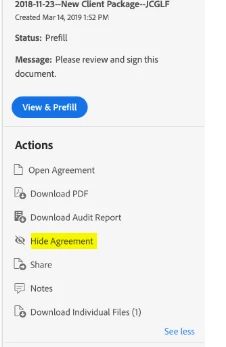
We have to prefil several our templates before we send them for signature. In doing so, we realize there is an error and need to modify the agreement or template. We have accumulated a few documents in "Waiting for You." There does not seem to be an option to cancel or delete these agreements. See the attached screen shot. How do you cancel or delete these agreements?


Thank you in advance. 
Correct answer MarjanA

Hi JCGLF,


Thank you for raising this point. 


To cancel the agreement, simply select 'Hide' on the right-hand menu. This will automatically cancel the agreement. 


Hope this helps!


Kind regards, 


1 reply

MarjanACorrect answer
Participating Frequently
December 23, 2019

Hi JCGLF,


Thank you for raising this point. 


To cancel the agreement, simply select 'Hide' on the right-hand menu. This will automatically cancel the agreement. 


Hope this helps!


Kind regards, 


sameer_puri
Adobe Employee
Adobe Employee
March 23, 2021

Hello,


If you hide an agreement from the manage page using the option mentioned by marjana51441123 the agreement should get hidden immediately from the manage page and the only way to see any such hidden agreements is if you check the 'Display Hidden Content' check box on the manage page:


Please let me know if this isnt working for you as mentioned above, I can work with you to raise any bugs if you are seeing any.


Regarding the requests to permanently delete an agreement, account Admins who are also Privacy Admins can do that (for security reasons, this capability is only granted to Admins of the Account). Please read the following help document to understand how to permanently delete agreements from Adobe Sign: https://helpx.adobe.com/sign/kb/to-delete-a-document-from-manage-Page.html


Thanks

Sameer Puri


Participant
April 29, 2021

Hi, I received a scam email request scam. Clearly this person got a hold of my email and realised I am Adobe user, and sent a fake HSBC account signature request. From there to click to view the document in order to decline, it request a phone verification. Clever,  the scammer now getting my phone number and signature at the same time. THE HIDE IS A USELESS WAY! Why won't you listen to customer, its been requested since 2019. I just want to delete this scam document away. But no - Adobe thinks hide them is better. I just want to DELETE them. Do you know that your system is compromising the safety of your users?