
Answered
How do I delete a document (draft or otherwise) in this new rollout?
How do I delete a document after yesterday's new revision? I don't see an option anywhere to delete a document - draft, in process, or signed & filed...

How do I delete a document after yesterday's new revision? I don't see an option anywhere to delete a document - draft, in process, or signed & filed...
Hi Psieradzki,
Sorry for the delay in response.
The Old manage tab is restored in the Adobe Sign for individual accounts.
You can now easily switch to the Old Manage tab by toggling the radio button for Adobe Sign Manage.
Check the screenshot below:
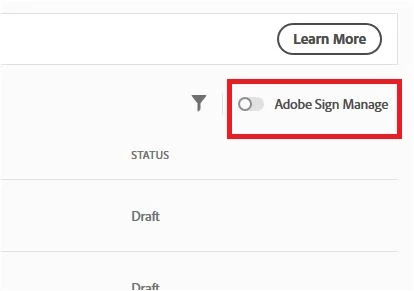
This will redirect you to the old manage window.
There you can easily delete, cancel or decline the documents as required.
Hope that helps.
Let us know if you have any questions or need any help.
Regards,
Meenakshi
Already have an account? Login
Enter your E-mail address. We'll send you an e-mail with instructions to reset your password.
 AdChoices