Exit
  • Global community
    • Language:
      • Deutsch
      • English
      • Español
      • Français
      • Português
  • 日本語コミュニティ
  • 한국 커뮤니티
0

How do I delete a document in my EchoSign library?

New Here ,
Aug 11, 2015 Aug 11, 2015

I have seen some of the other tutorials on line, but it seems like they show additional menu items I do not have.  Under 'Manage' I don't see any options to go delete existing documents. 
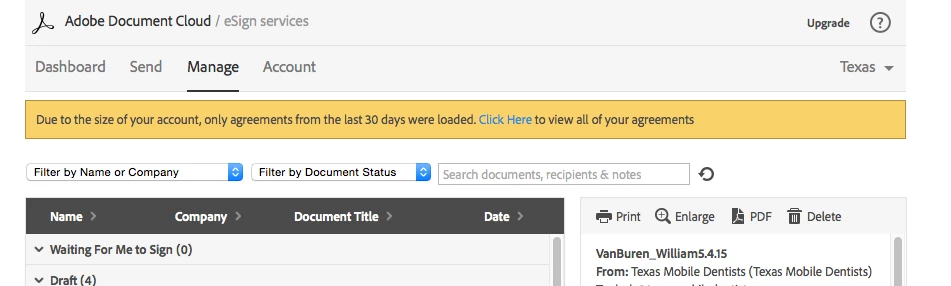
Screen Shot 2015-08-11 at 8.22.26 PM.png

4.6K
Translate
Report
Community guidelines
Be kind and respectful, give credit to the original source of content, and search for duplicates before posting. Learn more
community guidelines

correct answers 1 Correct answer

Adobe Employee , Aug 12, 2015 Aug 12, 2015

Hello,

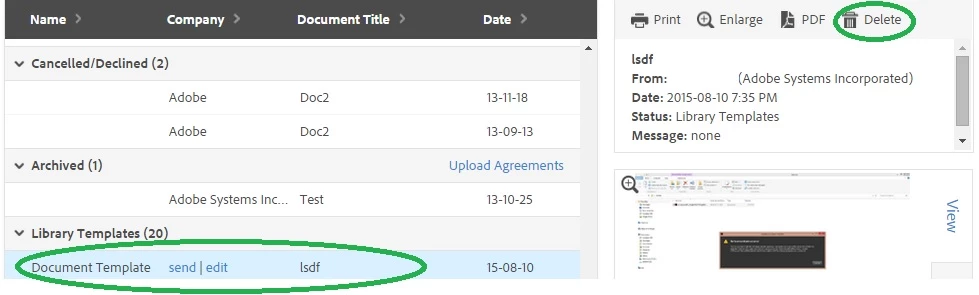
In order to delete the existing documents, you need to select the document in the manage page and click delete on the right side window.

DeleteDocuments.jpg

Regards,

Nakul

Translate
Adobe Employee ,
Aug 12, 2015 Aug 12, 2015

Hello,

In order to delete the existing documents, you need to select the document in the manage page and click delete on the right side window.

DeleteDocuments.jpg

Regards,

Nakul

Translate
Report
Community guidelines
Be kind and respectful, give credit to the original source of content, and search for duplicates before posting. Learn more
community guidelines
New Here ,
Aug 12, 2015 Aug 12, 2015

Perfect!  Thanks!

Translate
Report
Community guidelines
Be kind and respectful, give credit to the original source of content, and search for duplicates before posting. Learn more
community guidelines
New Here ,
Apr 13, 2018 Apr 13, 2018

I don't have the library template under the manage tab?

Translate
Report
Community guidelines
Be kind and respectful, give credit to the original source of content, and search for duplicates before posting. Learn more
community guidelines
Adobe Employee ,
Apr 13, 2018 Apr 13, 2018
LATEST

For the Library section to be visible on the Manage page, you have to have either created your own library template or have a template explicitly shared to you from another person.

Templates created by another user and shared by template property wont be listed in your Manage section, as you cannot manage them.

Translate
Report
Community guidelines
Be kind and respectful, give credit to the original source of content, and search for duplicates before posting. Learn more
community guidelines