
Participant
August 8, 2018
Answered

How do I make Adobesign ignore pdf fields?

  • August 8, 2018
  • 1 reply
  • 1731 views

When I upload certain pdfs into Adobesign, it automatically populates fields to be filled and signed, but I want to be able to manually create the few fields I want signed.  Is there a way to turn off the feature in Adobesign that automatically creates fields? 
This topic has been closed for replies.
Correct answer ScottCarter

Greetings!

If you upload a PDF that contains fields, Adobe Sign will always seek to render those fields.

There is no in-app function to automatically strip those fields. So you are not missing anything in the application.

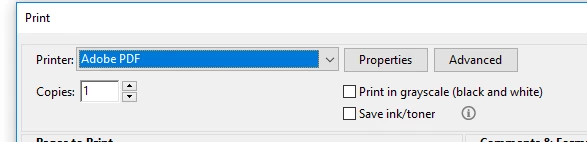
The best option I can offer you would be to push your PDF through a PDF Print Driver before uploading it.  This will "flatten" the PDF, and remove all of the fields.

PDF print drivers are pretty common these days, and if you have one installed, you will see it listed as a printer in your print options.

1 reply

ScottCarterCorrect answer
Participating Frequently
August 9, 2018

Greetings!

If you upload a PDF that contains fields, Adobe Sign will always seek to render those fields.

There is no in-app function to automatically strip those fields. So you are not missing anything in the application.

The best option I can offer you would be to push your PDF through a PDF Print Driver before uploading it.  This will "flatten" the PDF, and remove all of the fields.

PDF print drivers are pretty common these days, and if you have one installed, you will see it listed as a printer in your print options.

Participant
August 9, 2018

Thanks so much for your response!  Very helpful.  This is just what I needed.  Thanks a lot!