

Participant
October 4, 2018
Answered

How to change time zone?

  • October 4, 2018
  • 4 replies
  • 21347 views

When sending out a document for signatures, my Adobe Sign Document History has Pacific time zone, how do i change it to Eastern time zone?

Correct answer Adorobat

Hi tanya8965,

As per the issue description mentioned above, you want to change the time zone for the document sent using Adobe Sign, is that correct?

You can change the time zone to be used for agreements by going into Account settings > global settings. 

You may refer to the following help document for the same:

List of settings in Adobe Sign

Below is a screenshot:
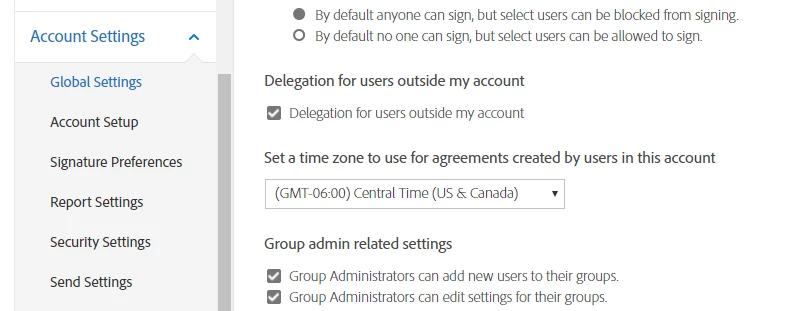
Let us know if you have a further query.

Shivam

4 replies

Participant
March 17, 2021

If you are on this screen - look at the top right, you'll see your profile "circle". (Mine had a face icon in it, I think Adobe generates it for you.) Click on THAT. Then, you'll see a "settings" option. Click it and you can put in your Time Zone. Hopefully that solves the e-signature time stamp issue.

Participant
November 11, 2020

how do I get to my account settings>global settings


Participant
November 13, 2020

What I ended up doing is going online into my account, where it shows what apps you may have under "PDF and e-signatures" I selected "Document Cloud Home" THEN over on the far right is the same "profile" circle that takes you "nowhere" on the previous screens, BUT this time when you click you have a "Settings" option, click "Settings" you'll get a pop up, and mine has "E-signing settings" click "Edit settings" and it will pull up that menu along the side of your screen. I hope that gets you where you need to be, I have no clue of another way to get there, not super inutitive.  

Participant
March 30, 2020

After sending a document to be signed,  the final audit report shows the time in GMT zone and I need it in EST zone. How can this be changed?

Participant
April 28, 2021

Hello,

After sitting on hold for almost an hour to ask this same question, the customer support person basically told me it can't be done and took me to this link. https://helpx.adobe.com/in/sign/using/audit-reports-transaction-history.html 

The issue I have is that in the past I had it set to PST and it was correct but now I can't even get to the setting screen to change it. Maybe they updated their system and don't allow it right now but I hope they change it back because I need accurate information on our documents. If we do all our business in PST I don't want the documents to show GMT.

Participant
April 28, 2021
Thank you so much for reaching out to me about this problem. I agree
totally with you. We should be able to enter in our time zone so that legal
documents with signature, date, and time are correct. However I do
understand why they left it at GMT due to audits that might take place
across state lines. If anyone asks me about the time legally, I will
explain what GMT represents and then give them a copy of the conversion
chart. Again, I thank you for being the one who unfortunately had to hold
on the phone so long.
Nancy from Lilburn, Georgia

--
Nancy Meredith - Office Manager
MPM Creative Therapy Services
Phone: 469-431-3830
Fax: 678-585-6745
Adorobat
Community Manager
AdorobatCommunity ManagerCorrect answer
Community Manager
November 19, 2018

Hi tanya8965,

As per the issue description mentioned above, you want to change the time zone for the document sent using Adobe Sign, is that correct?

You can change the time zone to be used for agreements by going into Account settings > global settings. 

You may refer to the following help document for the same:

List of settings in Adobe Sign

Below is a screenshot:

Let us know if you have a further query.

Shivam

elid64694331
Participant
March 11, 2020

Hi,


Can you please let me know how to do this change? Where do I need to go in order to find that window that you're sharing as a screenshot? I'm having a hard time trying to change the time zone as well.


Thanks!

Participant
April 29, 2020

I was able to change mine under "Account" then "Edit Profile". I did not have a "Global Settings" option.