Participant
September 26, 2019
Answered

How to delete a shared file link

  • September 26, 2019
  • 2 replies
  • 5674 views

Hello Team,


With my cloud account associated I uploaded a pdf which I wanted to edit and sign. I used fill and sign option for pdf and then clicked on send a copy I saw message as below

CREATE LINK WITH ADOBE SIGN
Get a link to a non-editable copy of your file and share it with others. Anyone with access to the link can view the file. Your file will be uploaded to Adobe Sign.

and create link below it .

After hitting create link button I was presented with url which I dont want any more as it is public to whole world but I dont know how to disable/delete or remove it .

The link looks something like below
https://adobefreeuserschannel.na2.documents.adobe.com/public/fs?aid=

Please help me to get rid of this url as soon as possible


Regards,
San

    This topic has been closed for replies.
    Correct answer Meenakshi Negi

    Hi San,


     As you are using Document Cloud to access Adobe Sign account, use the steps provided below in order to delete the document from Adobe Sign account permanently.

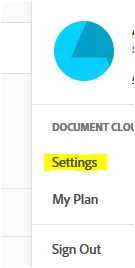
         - In the account, click on the circle in blue provided at the extreme right-hand side of the screen.

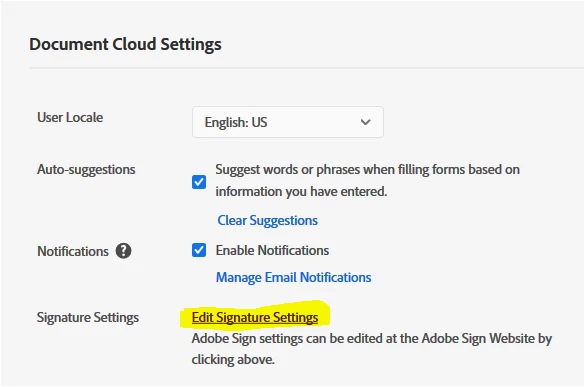
        - Select Settings > Edit signature settings.


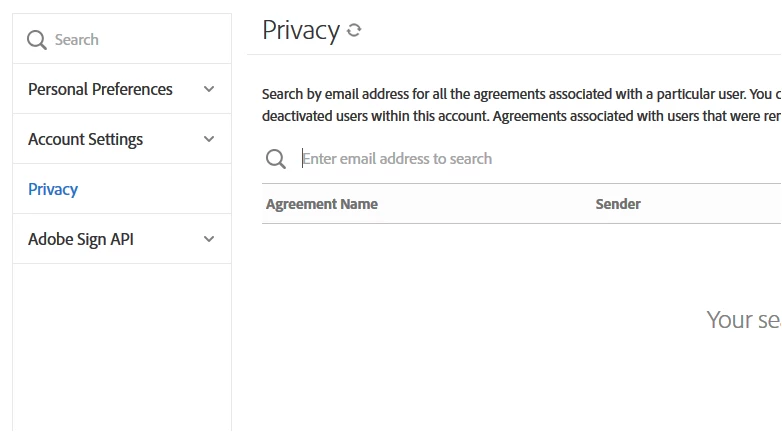
       - Then select "Privacy" from the left-hand side pane.

       - Enter the email address of the recipient in the search bar. That will open all the documents for that particular recipient.

       - Select the document from the list that needs to be deleted.

       - Click on the trash icon provided at the extreme right-hand side of the document.


    Hope the information helps.

    Let us know if you have any questions.


    Regards,

    Meenakshi


    2 replies

    Meenakshi Negi
    Community Manager
    Community Manager
    October 4, 2019

    Hi Sangonew,


    Glad to know that the information worked for you.

    Let us know if you need any further help.


    Regards,

    Meenakshi

    Meenakshi Negi
    Community Manager
    Meenakshi NegiCommunity ManagerCorrect answer
    Community Manager
    September 27, 2019

    Hi San,


     As you are using Document Cloud to access Adobe Sign account, use the steps provided below in order to delete the document from Adobe Sign account permanently.

         - In the account, click on the circle in blue provided at the extreme right-hand side of the screen.

        - Select Settings > Edit signature settings.


       - Then select "Privacy" from the left-hand side pane.

       - Enter the email address of the recipient in the search bar. That will open all the documents for that particular recipient.

       - Select the document from the list that needs to be deleted.

       - Click on the trash icon provided at the extreme right-hand side of the document.


    Hope the information helps.

    Let us know if you have any questions.


    Regards,

    Meenakshi


    sangonewAuthor
    Participant
    September 28, 2019
    Hello Meenakshi,
    sangonewAuthor
    Participant
    September 28, 2019
    Your solution worked. Thanks for your help.