Participant
September 30, 2020
Answered

How to receive documents separately when send for signature?

  • September 30, 2020
  • 1 reply
  • 1393 views

Bonjour, Est-il possible lorsqu'on envoie plusieurs PDF pour signature, de les récupérer en plusieurs fichiers et non en un seul groupé?

Or

Hello, Is it possible when you send multiple PDFs for signature, to retrieve them in multiple files and not in a single group?

This topic has been closed for replies.
Correct answer Meenakshi_Negi

Hey!


Thank you for reaching out.


Yes, there is an option to set the documents to return as individual copies after they are signed. However, the feature to receive the document separately is only available in Adobe Sign business and enterprise service plan.

The options will not be available in Adobe Sign individual and small business accounts.


To enable the feature, use the steps mentioned below:

  • Sign-in to the Adobe Sign account
  • Go to Accounts > Account settings > Global settings
  • Under the “Merge multiple documents into one document after signing” select the radio button for “Keep documents separated”.
  • Click on the Save button appear at the bottom left of the window.
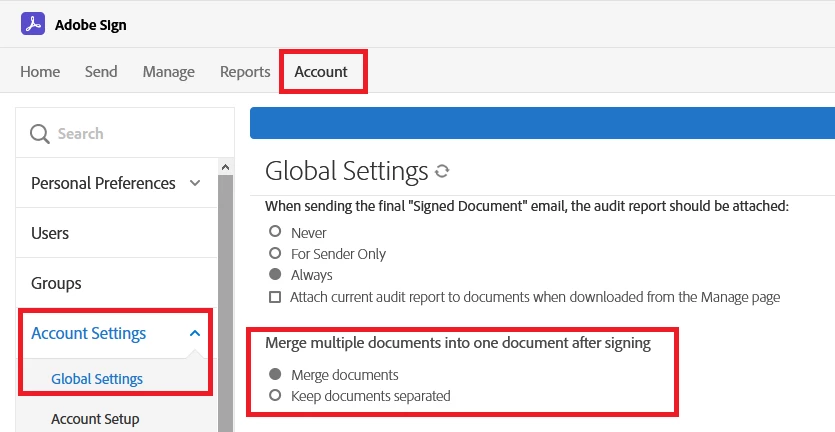


Hope the information helps.

Let us know if you have any questions.


Thanks,

Meenakshi



1 reply

Meenakshi_Negi
Meenakshi_NegiCorrect answer
Legend
September 30, 2020

Hey!


Thank you for reaching out.


Yes, there is an option to set the documents to return as individual copies after they are signed. However, the feature to receive the document separately is only available in Adobe Sign business and enterprise service plan.

The options will not be available in Adobe Sign individual and small business accounts.


To enable the feature, use the steps mentioned below:

  • Sign-in to the Adobe Sign account
  • Go to Accounts > Account settings > Global settings
  • Under the “Merge multiple documents into one document after signing” select the radio button for “Keep documents separated”.
  • Click on the Save button appear at the bottom left of the window.


Hope the information helps.

Let us know if you have any questions.


Thanks,

Meenakshi


Participant
April 26, 2022

Hi,


Is there any way to keep these documents seperated on a per-user basis? I do not wish to remove functionality to merge documents for all users


Kind regards,


Ciarán

Adobe Employee
May 20, 2022

Hi @Ciaran240396648lkj,


It is possible to do so on a Group level. You may assign users in a specific group for whom you wish to remove this functionality and override account level settings for this specific group, keeping the Account level setting as is.


Thanks,

Sritama