
Participant
November 3, 2021
Question

Is there a way to have fields hide themselves if the participant assigned to the field is approver?

  • November 3, 2021
  • 1 reply
  • 300 views

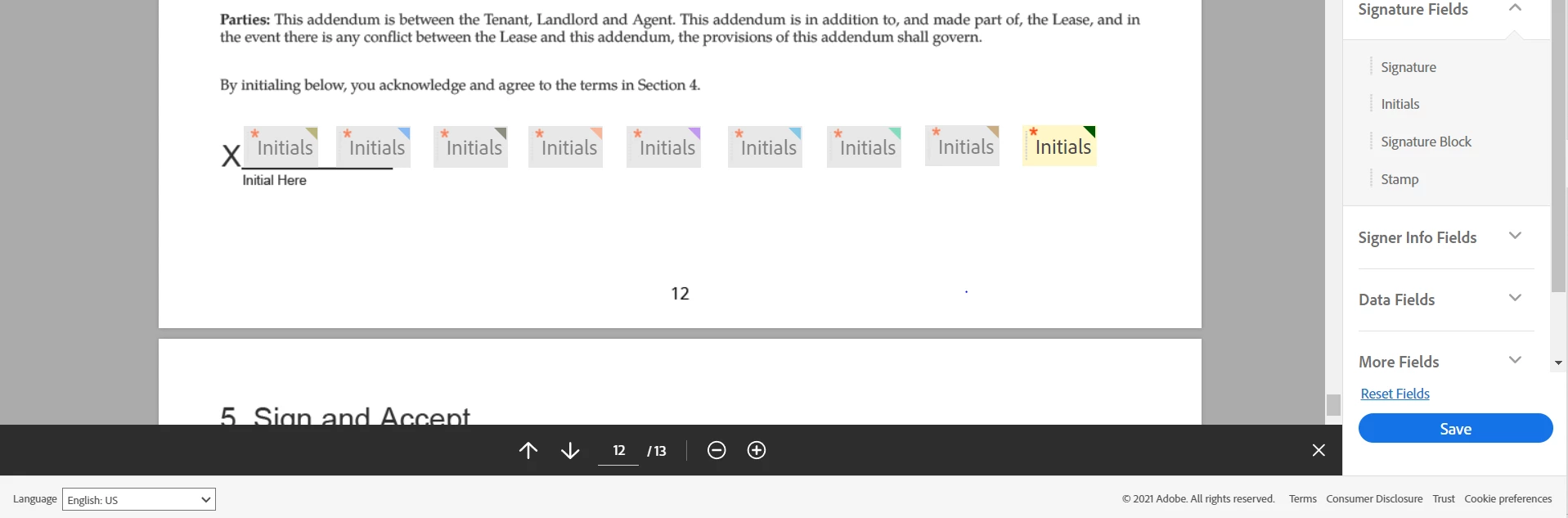
We are trying to automate a process where we can use a singular workflow to work for all our contracts. We have made a space for 8 potential signers, 1 owner, and 1 agent. The agent in this case is the approver. In the image attached, there are 9 spaces to initial: 8 for the tenants and 1 for the owner. 

The agent does not need to initial, just needs to sign at the last page, and this works as long as all 8 spots for tenants are filled. 

The problem arises when there are fewer than 8 tenants and the agent is required to initial. 

I am unable to use the condition function of the fields to make it so that it will automatically hide when the participant assigned to it is an approver. 

If we could figure this out, we would not need to create a new form for every number of tenants.
This topic has been closed for replies.

1 reply

Community Manager
November 4, 2021

Yes I understand the probem, you have a fixed first participant and a fixed last partcipant and then a variable number of participants in between. The field assignment is derived from the index of particiants


Conditions are not allowed on initial and signature fields 


Simplest solution is t try and have all variable signers be the last part, but business rules won't always allow for that.

You could have multiple template catering for each possible scenario, but this adds up to a lot of templates.

One option if you have a Sign account with access to workflow, is to use a workflow and tmake use of the 'Template defined field assignment' option.


See: https://helpx.adobe.com/sign/using/workflow-designer-signature-workflow.html


Another alternative would be to make use of the Sign api v6, but that may be a tad overkill.