
Participant
December 18, 2017
Answered

Mega Sign and Reminders

  • December 18, 2017
  • 1 reply
  • 1953 views

When sending via Mega Sign, there is no option to set reminders on a per-agreement basis (as opposed to the standard "Get a Document Signed" workflow). After sending via Mega Sign, it is possible to select agreement instances on a per-email address basis to set reminders, but it is not possible to do this in bulk or to multi-select addresses (let alone set on a conditional basis for all recipients whose agreements are "Out For Signature").

In Account Settings, there is an option to "Set a default reminder for agreements created by users in this account" - does anyone know how this Account Settings reminders default interacts with Mega Send agreements?

thanks,

Lee

Note that this is one of many glaring shortcomings with regards to Mega Sign, and anyone considering using this feature is encouraged to thoroughly think through your needs. Be forewarned that the available documentation does not adequately surface the ways in which the features for one-off agreements are not available for Mega Sign ones.
This topic has been closed for replies.
Correct answer Meenakshi Negi

Hi Lee,

Sorry for the delay in response.

If you are looking for the option to set a reminder for the document sent via Mega Sign for all the signers, there is an option under the Manage Tab.

Once you send the file via Mega Sign, go to Manage tab and select the file from the list under Out for Signature.

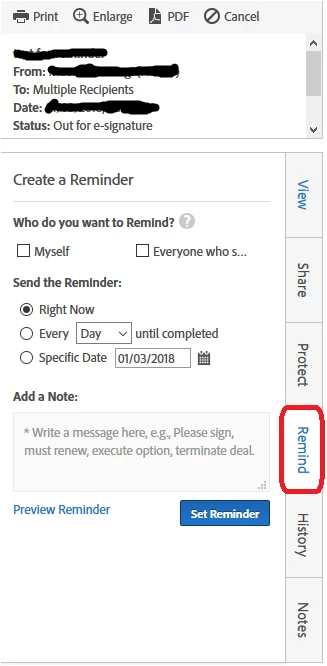
The file will open in the preview pane at right. There you will find a vertical tab named "Remind" as shown below in the screenshot:

Click on that tab and it will open the page to set a reminder.

Check if this what you were looking for.

Let us know if you have any questions.

Regards,

Meenakshi

1 reply

Meenakshi Negi
Meenakshi NegiCorrect answer
Legend
January 3, 2018

Hi Lee,

Sorry for the delay in response.

If you are looking for the option to set a reminder for the document sent via Mega Sign for all the signers, there is an option under the Manage Tab.

Once you send the file via Mega Sign, go to Manage tab and select the file from the list under Out for Signature.

The file will open in the preview pane at right. There you will find a vertical tab named "Remind" as shown below in the screenshot:

Click on that tab and it will open the page to set a reminder.

Check if this what you were looking for.

Let us know if you have any questions.

Regards,

Meenakshi

RNPARNPA42378772
Participant
July 16, 2018

I have the same questions but would like to do a mass or bulk reminder. Not individual reminder.

Meenakshi Negi
Legend
July 19, 2018

Hi Michaelb,

By mass reminder, do you mean to set a reminder on the multiple documents at once not individually on each document?

If yes, sorry by default there is no option to add a bulk reminder in the application.

You may try once contacting the support directly and check with them.

To contact support

  • Login to your Adobe Sign account directly via https://secure.echosign.com/public/login
  • Once logged in, check the upper right corner of the page and click the question mark icon.
  • It will re-direct you to a page where you get an option to chat or create a support case.
  • If you've never logged in this way, use the forgot password option on the login link to set your password.

Let us know if you need any help.

Regards,

Meenakshi