
Participant
June 14, 2021
Question

Need to delete a prior signor from my signature request dropdown

  • June 14, 2021
  • 4 replies
  • 1432 views

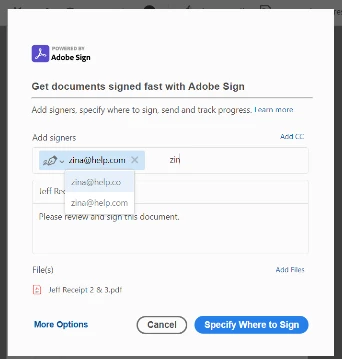
When I am sending a document under "request signatures" I begin to type their email and a list appears  from which I can select a previous signor.  How do I remove an email/signor that is no longer valid or was mispelled from that list so it is not selected in error?


This topic has been closed for replies.

4 replies

Participant
September 17, 2024

I would also like to know how to do this


Meenakshi Negi
Community Manager
Community Manager
June 25, 2021

Hello,


Thank you for reaching out and sorry for the delay in response.


By screenshot, it seems that you are using the Request Signature feature in Acrobat Pro DC.

As you wish to remove the email address from the suggestion, please click on the "More Options" provided in the screenshot that you have shared above.

In the Adobe Sign window, you will see an "X" icon at the right of the email suggestion. Click on that and it will get removed.


Let us know if you need any help.


Thanks,

Meenakshi

Participant
September 17, 2024

Meenakshi,  By selecting the X    this does not delete the incorrect email option..

Participant
June 22, 2021

I apologize but I was trying to figure out if I could just clear the Browser Data Cache for just Adobe and not for all my programs which I do know how to do but not sure I want to do.  I read some articles on clearing Adobe Cache's but when I follow the path referenced in the articles, my program does not have those choices.  Can you clarify if you meant for me to just clear my Adobe Cache or all Browser history?   I admit that I was too embarrassed to admit that I did not know how to clear just my Adobe Cache.


Participant
June 24, 2021

Were you able to resolve this?  We have a similiar issue and need to clear the "cache" of email addresses from a specific users Adobe Sign application.

Participant
June 24, 2021

I have not tried to cleared the entire web browser cache and I have not figured out if there is a way to clear just Adobe cache.

Participating Frequently
June 15, 2021

Hi @danam54965564 

When you log in to Adobe Sign, can you please try cleaning all the browser data cache.

Regards
Aditya