Brittany Senerote
Participant
January 12, 2018
Answered

(Sent/Pending Signature ect.)?

  • January 12, 2018
  • 2 replies
  • 915 views

Is there a way to have the signed form emailed to a certain email once the signer1 has signed without that email receiving all of the other notification like (Sent/Pending Signature ect.)?

    This topic has been closed for replies.
    Correct answer Meenakshi Negi

    Hi brittanysenerote,

    Sorry for the delay in response.

    As per your statement above, do you mean to say once the document is signed, it automatically sent to a third email address without any notification to others?

    If not it would be helpful if you can elaborate a bit what exactly you are trying.

    If you just wish to send a copy of the signed document to some other email address, there is a setting where you can add the alternate email address.

    However, the setting is not provided in the individual account for Adobe Sign.

    It should be the business level account.

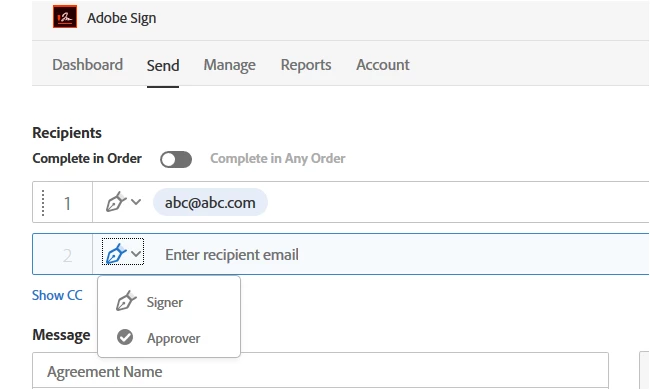
    You may try this workaround when sending the document for signature, you can add that email address as an approver after adding the signer.

    Once the document is signed, it will be forwarded to the other email address. Check the screenshot below:
    Hope that helps.

    Let us know if you have any question.

    Regards,

    Meenakshi

    2 replies

    Community Manager
    April 13, 2018

    By default, using the CC field will only notify the CC'd parties when the agreement is created and completed.

    If you have an Enterprise level account, your success manager can suppress the creation email to CC'd parties.

    If the CC'd party changes per transaction, the CC field on the Send page is the best way to leverage it (so you can change it readily).

    If you have the need to CC the same email on Every transaction that comes from any one group, or the Account as a whole (and again only want the Signed and Filed email), you can use the Archive feature:

    Meenakshi Negi
    Community Manager
    Meenakshi NegiCommunity ManagerCorrect answer
    Community Manager
    March 5, 2018

    Hi brittanysenerote,

    Sorry for the delay in response.

    As per your statement above, do you mean to say once the document is signed, it automatically sent to a third email address without any notification to others?

    If not it would be helpful if you can elaborate a bit what exactly you are trying.

    If you just wish to send a copy of the signed document to some other email address, there is a setting where you can add the alternate email address.

    However, the setting is not provided in the individual account for Adobe Sign.

    It should be the business level account.

    You may try this workaround when sending the document for signature, you can add that email address as an approver after adding the signer.

    Once the document is signed, it will be forwarded to the other email address. Check the screenshot below:

    Hope that helps.

    Let us know if you have any question.

    Regards,

    Meenakshi