
psieradzki001
Participant
September 14, 2018
Answered

Templates with prefill not working after Sept 6 update

  • September 14, 2018
  • 1 reply
  • 1177 views

I have two saved Adobe Sign templates that I created half a year ago, both with areas for me to "prefill".  Both templates worked properly until the Sept 6 update.  Since the update, neither template works.  Specifically, when I enter email addresses and "send" the template, the next step would normally be that the template displays in the browser as a form for me to prefill.  However, since the update, the template doesn't show up as a form for me to prefill but rather shows up as the template in the "create/edit" mode.  Help!  How can I overcome this?  Is there a patch in the works to rectify the Sept 6 update?
This topic has been closed for replies.
Correct answer Meenakshi Negi

Hi Psieradzki,

As you have mentioned above, the template opens in the create/edit mode when you click on Send button.

It seems that you get the preview page where you can make the changes to the form fields on the document.

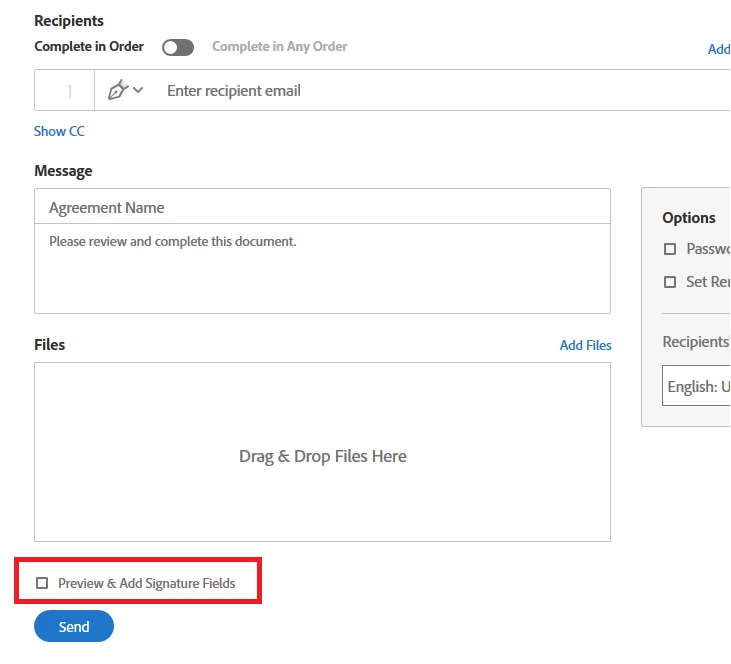
To get the document for prefill when you click on Send, you need to make sure that the box for "Preview & Add Signature Fields" is unchecked.

Check the screenshot below for the option "Preview & Add Signature Fields":

Hope that resolves the issue.

Let us know if you are referring to something else.

Regards,

Meenakshi

1 reply

Meenakshi Negi
Meenakshi NegiCorrect answer
Legend
September 17, 2018

Hi Psieradzki,

As you have mentioned above, the template opens in the create/edit mode when you click on Send button.

It seems that you get the preview page where you can make the changes to the form fields on the document.

To get the document for prefill when you click on Send, you need to make sure that the box for "Preview & Add Signature Fields" is unchecked.

Check the screenshot below for the option "Preview & Add Signature Fields":

Hope that resolves the issue.

Let us know if you are referring to something else.

Regards,

Meenakshi

psieradzki001
Participant
September 17, 2018

While I'm not sure whether the "Preview & Add Signature Fields" was checked or unchecked previously, I confirmed that it's unchecked this morning and it's now functioning as expected.  Thank you for the help!