
Participant
November 1, 2018
Answered

Unable to enter prefilled text fields

  • November 1, 2018
  • 1 reply
  • 1316 views

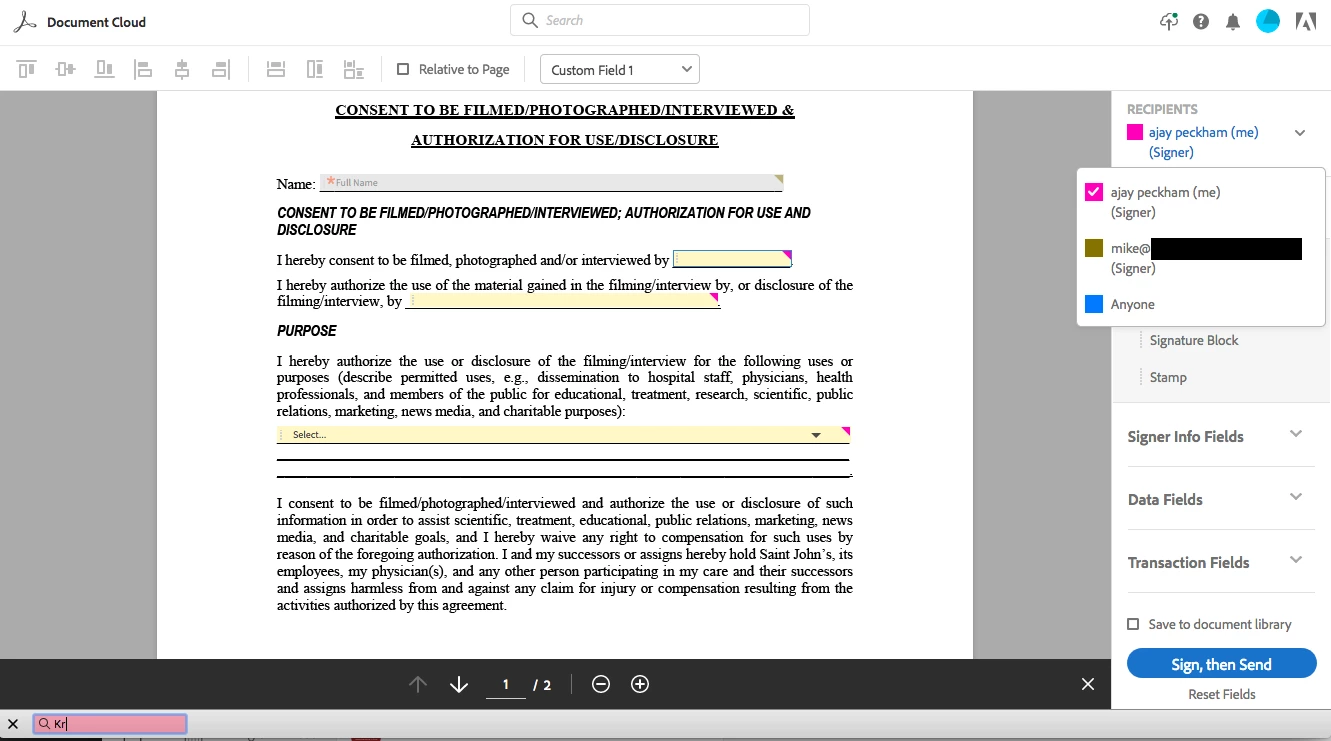
I've never encountered this problem before Adobe Sign redesigned their platform recently. Now, I'm unable to enter any information into the prefilled fields that are assigned to me (whereas this used to be no problem at all). The signature fields in my template are assigned to Participant #2, but I need to prefill certain fields before it goes to them. Whenever I attempt to type, it boots me out of the field, as you can see in the screenshot (in the bottom left it relegates any typing to a search query in the web browser). What's the magic trick to be able to type into prefilled forms that are assigned to me?
This topic has been closed for replies.
Correct answer scottk83981073

Hit "sign then send" and it will take you to the real pre-fill page. It's an idiotic change they made, now every doc you send will prompt you to edit the fields first but it doesnt say that anywhere. Hitting SEND would imply that it SENDS it but apparently nobody at adobe thought that through.

1 reply

scottk83981073Correct answer
Inspiring
November 1, 2018

Hit "sign then send" and it will take you to the real pre-fill page. It's an idiotic change they made, now every doc you send will prompt you to edit the fields first but it doesnt say that anywhere. Hitting SEND would imply that it SENDS it but apparently nobody at adobe thought that through.

Participant
November 1, 2018

Thank you! I *never* would have imagined hitting the SEND button would bring me to another pre-fill page. Very odd work there, Adobe.